
A lot of drummers reach the custom head stage at the same moment. The band finally sounds locked in, the songs are ready, the socials look decent, and then somebody grabs a live photo and the whole front line looks branded except the kick drum. Great set. Anonymous kit.
That's why personalized bass drum heads matter more than most players expect. They don't change a weak band into a strong one, but they do make a solid band look finished. For a buyer deciding whether to order one, the primary question usually isn't “Can a drum head be printed?” It's “Will this make the kit look professional, and will it hold up once it's on stage?”
Your Kit Is More Than Just Sound It Is Your Stage Identity
Load-in is done, the lights come up, and the first wide photo from the pit hits social before the set is over. If the front of the kick is blank, the kit reads like borrowed backline even when every drum on stage is yours. A personalized bass drum head fixes that in one move. It puts the band name, artist mark, school crest, church logo, or event graphic on the part of the kit everyone already sees first.
From the print side, this is usually the point where buyers stop talking about whether custom heads look cool and start asking better questions. Will the logo read from the back of the room? Will black stay rich under stage wash? Will the design still look clean once a mic port is added? Those are the decisions that separate a head that looks good in a mockup from one that works on a real stage.
Why the front head carries so much visual weight
The bass drum gives you the largest uninterrupted branding area on the kit. It does a lot of work with very little visual clutter.
- It makes the kit identifiable fast: one clear mark on the kick is often all a photographer or audience member needs to connect the stage setup to the band.
- It makes mixed gear look intentional: a printed front head can pull together rented backline, mismatched finishes, or a festival setup that changes every night.
- It holds up across different uses: club dates, worship stages, recitals, content shoots, showcase sets, and promo photos all benefit from a centered graphic that reads clearly.
I see the same hesitation all the time in orders from local bands, teachers, schools, and churches. They assume custom heads are for touring acts with a full production team. In practice, smaller groups often get more mileage out of them because every show, every photo, and every video clip has to do some branding work.
A good custom head also solves a common stage problem. It gives the eye somewhere to land. That matters more than drummers sometimes expect, especially on crowded stages where cables, stands, wedges, and shared backline can make the setup feel messy.
What changed over the years is execution. Printed heads now look like part of the drum, not an afterthought stuck on the front, so the result holds up better under lights and in close photos. For buyers who want a realistic sense of what reads well on actual kits, this Photo gallery of finished drum heads shows how logos, photos, type-driven designs, and simple marks translate from file to stage.
Choosing the Right Canvas for Your Art
A drummer sends over a great logo, approves the mockup, then realizes too late they picked the wrong head for the way the kit is used. That is one of the most common ordering mistakes we see. The print can be excellent and still feel off if the surface, head position, or port plan does not match the job.
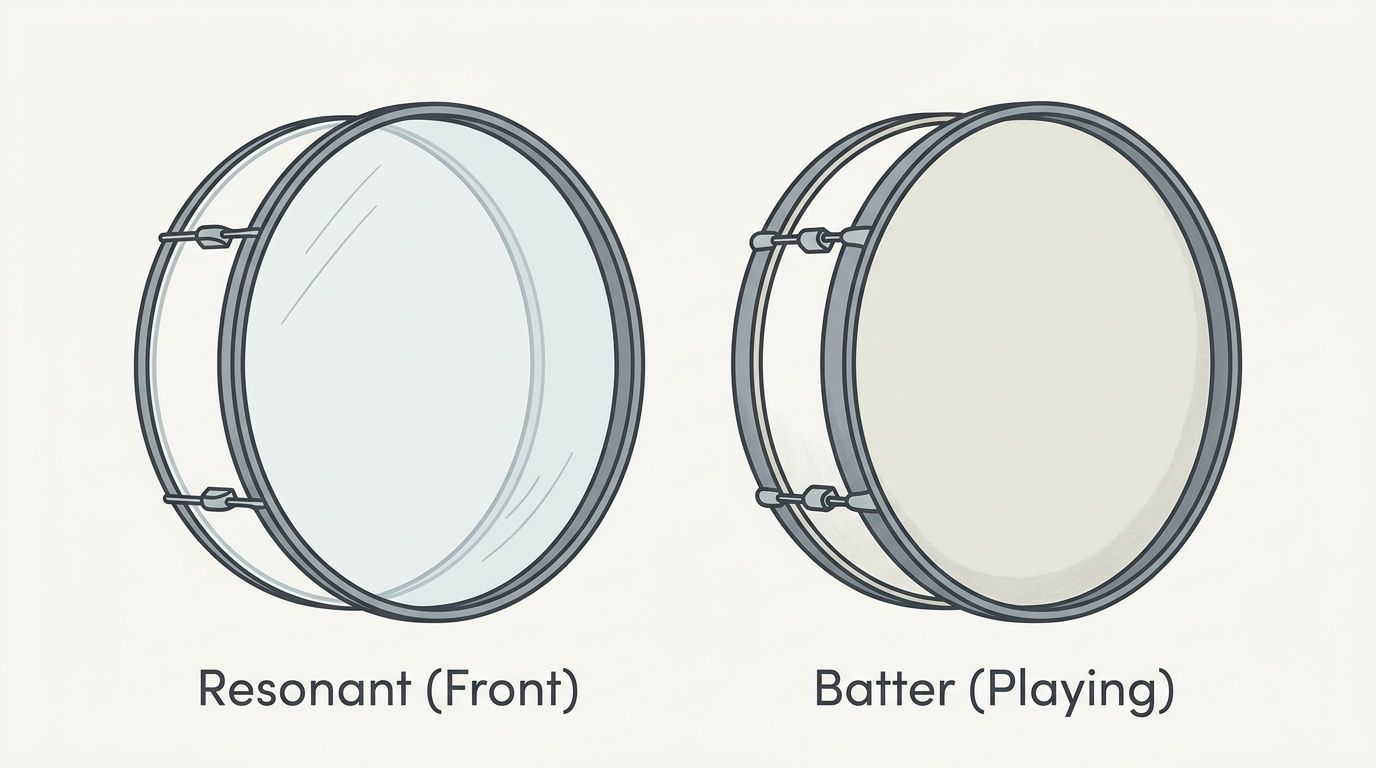
Resonant head or batter head
For most orders, the right choice is a resonant head. It faces the crowd, shows up in photos, and keeps the artwork away from pedal impact and routine playing wear. If the goal is stage presentation, this is the standard setup for a reason.
A printed batter head is a narrower use case. It can make sense for showroom kits, content sets, brand displays, or a player building something intentionally unusual. It does not stay pretty for long under regular use. Beater marks, scuffs, and tuning changes show up fast, so buyers should choose it for the look with full awareness of the wear.
Here is the practical split:
| Head type | Best use | Main trade-off |
|---|---|---|
| Front resonant head | Stage branding, logos, photos, clean visual presentation | Needs planning for a mic port if the setup requires one |
| Batter head | Display pieces, novelty builds, controlled-use setups | Printed surface takes direct playing wear |
Surface choice changes the print
The same art file will not look the same on every head material. Thousands of orders teach the same lesson. Surface choice affects both print clarity and how the finished drum reads under lights.
- Smooth white is the safest choice for full-color work. It gives the cleanest result for photos, gradients, bold fills, and dark backgrounds.
- Clear works best when the design is simple and the shell is meant to stay part of the look. Small logos and sparse artwork usually translate better here than dense graphics.
- Coated or textured surfaces can be useful, but they soften the print slightly. If the file has fine lines, small type, or tight detail, a smoother surface usually prints cleaner.
I usually steer buyers toward smooth white unless they have a clear reason to do something else. It is easier to predict, easier to mock up accurately, and easier to make look polished on a wide range of kits.
Match the look to the job
A front head is still a drumhead, not just a print surface. The right pick depends on how the kit is played, how often it is miked, and how demanding the artwork is.
For a touring or regularly gigged kit, a single-ply front head is the usual starting point because it keeps the response familiar while still taking a clean print. If the design is the priority, smooth white gives the fewest surprises. If the shell finish is part of the visual idea, clear can look excellent, but only when the artwork is built for that transparency.
The cleanest orders happen when the buyer decides these details before final art approval. Size, head position, surface, and port choice all affect how the design should be laid out. Buyers comparing finish options and budget can review current pricing for photo-quality drum heads before locking in the final spec.
Preparing Your Artwork for a Flawless Print
The order usually goes sideways at the same point. A band sends over a logo that looked sharp on Instagram, then we drop it into a 22-inch layout and the edges fall apart. By the time that happens, the design itself is rarely the problem. The file is.
Vector beats raster when possible
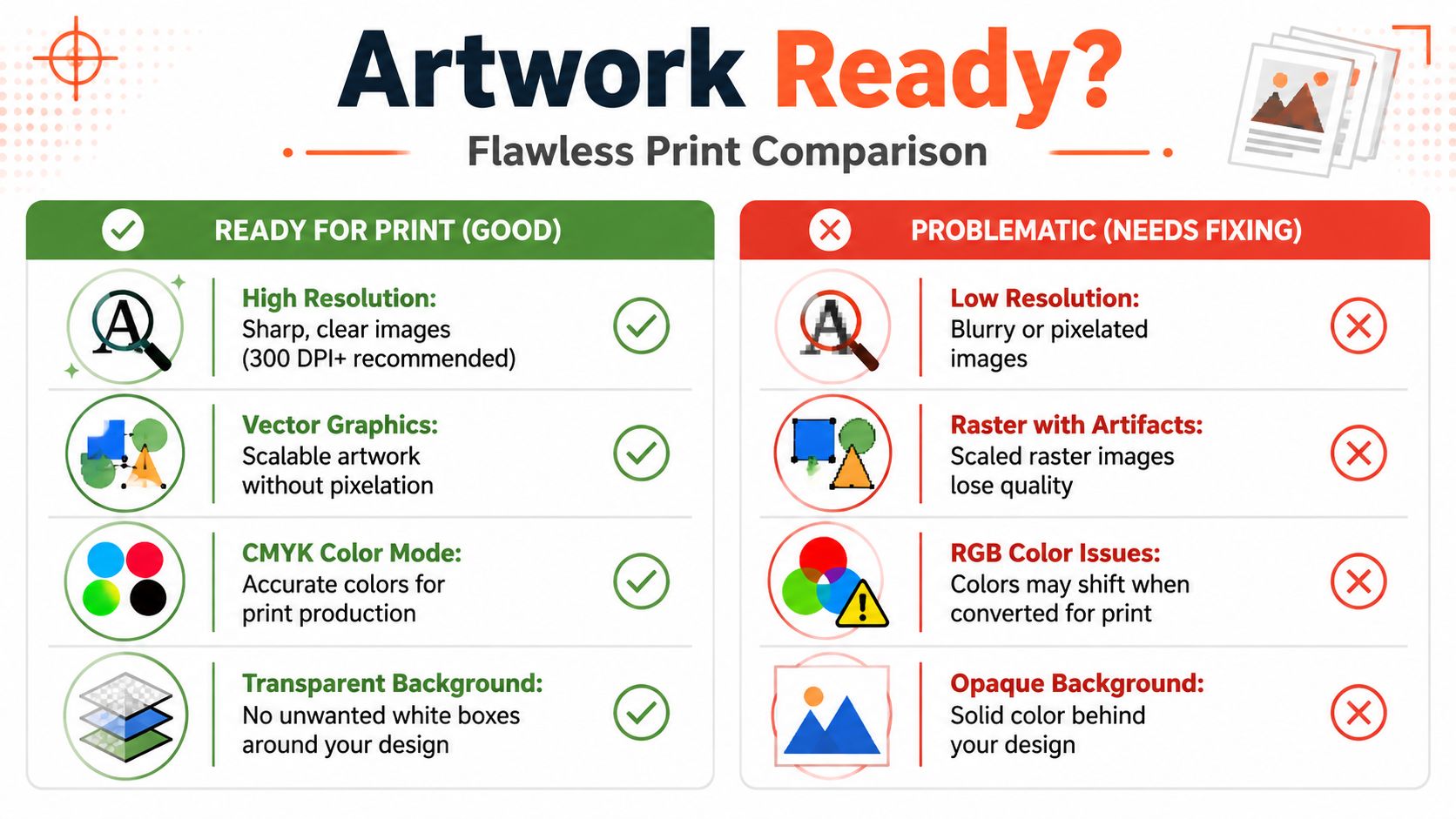
After printing thousands of heads, the cleanest jobs almost always start with vector art. PDF, AI, and EPS files scale cleanly because the logo is built from paths instead of pixels. That matters on a bass drum head, where even a simple mark may need to hold up under stage lights, in phone photos, and from the back of the room.
Raster files can still work. They just have less margin for error. A JPG, PNG, or TIFF needs to be built at the actual print size with enough resolution to stay sharp. As a rule, 300 DPI at full size is the safe baseline.
Color mode matters too. Files prepared in CMYK tend to produce more predictable print color, while RGB artwork often loses some of the glow it had on a screen. Bright blues, greens, and neon-style tones are the usual trouble spots, so it helps to set expectations before approval instead of after the head arrives.
The file problems we see over and over
A lot of disappointing prints come from the same few mistakes.
A web logo pulled from social media
Social graphics are built for small screens, not a full-size front head. Once enlarged, the curves get jagged and thin lines start to fuzz out.Artwork designed in a square, then forced into a circle
A bass drum head has a hard round boundary. Text near the edge, boxed layouts, and badge-style designs need to be composed for that shape from the start or they end up feeling cramped and off-center.Live fonts left in the file
If the type is not outlined, font substitution can change spacing, line breaks, or the whole look of the logo. It is a small technical step that prevents a big production headache.Screen-first color choices
Some artwork is built to glow on a monitor. Print behaves differently. Strong contrast and clear hierarchy usually win over subtle gradients and low-contrast details.
I tell buyers the same thing every week. If the logo needs to read in a dark club and still look clean in a close-up photo, build the file for print first.
What to send to the printer
The smoothest approvals come from a clean handoff. If a designer is preparing the file, this is what we want:
- A vector master file in PDF, AI, or EPS
- A high-resolution raster version if the design includes photos or texture work
- A transparent background file for floating logos or isolated marks
- All fonts converted to outlines
- Any placement notes for the mic port so no key text or artwork gets cut into later
That last point gets missed all the time. If the order includes a port, the artwork should be composed around it before print, not adjusted after the fact. A great design can get kneecapped by a port hole placed through the band name, a face in a photo, or the middle of a detailed crest.
For more examples of what tends to go wrong before upload, this guide on avoiding drum artwork pitfalls is worth reviewing before the file goes out.
How Your Design Comes to Life
A professional custom head shouldn't look like someone stuck a giant decal onto a drum. It should look like the graphic belongs there.

Direct printing is the difference
The biggest misunderstanding buyers bring into the process is assuming all custom heads are basically sticker jobs. Good ones aren't. The artwork is printed directly onto the drumhead material with a process built for flexible performance surfaces.
That matters for two reasons. First, the head stays visually cleaner because there's no extra film edge to notice. Second, it avoids the familiar problems that made older DIY approaches look temporary, like bubbling, peeling, and lifting over time.
What the real-world result looks like
A printed bass drum head should be judged like a premium physical print, not like a backlit monitor. Screens throw light through color. A drum head reflects light from the room, the stage wash, and whatever camera is pointed at it.
That's not a downgrade. It's just the correct expectation. Designs with strong contrast, clear hierarchy, and breathing room usually outperform busy art that only looked impressive on a bright display.
A few practical truths help here:
- Large logos read better than small details: if the crowd can't decode the mark quickly, the design is doing too much.
- Black coverage needs intention: solid dark fields can look excellent, but they should support the concept rather than fill space by default.
- Negative space helps from a distance: some of the strongest personalized bass drum heads are surprisingly restrained.
Shop-floor reality: the file that gets compliments on stage is rarely the one with the most effects. It's the one that still reads when the lights change and the audience is moving.
Buyers who want a deeper look at production expectations can review how to prepare artwork for a custom drumhead before placing the order.
Mic Ports Installation and Care
Load-in is in 20 minutes, the front-of-house engineer wants a mic inside the kick, and your logo is about to disappear behind a hole that should have been planned before the order was placed. That is usually when players realize the mic port is not a minor add-on. It affects the print layout, the setup on stage, and how fast the kit gets miked.

After printing thousands of heads, the pattern is clear. Players who decide on the port early get cleaner artwork and fewer compromises. Players who wait until after approval often force a last-minute hole into the wrong part of the design.
Choosing the port size and position
Most port requests fall into the 4-inch to 6-inch range. Smaller ports preserve more of the artwork. Larger ports make mic placement easier and give the engineer more room to work. The right choice depends on whether the drum is used mostly for live gigs, quick festival changeovers, or a controlled studio setup.
Position matters just as much. A centered port can work if the design is built around it, but it cuts straight through the visual focal point on many logos. In day-to-day shop work, the safest choice is usually low left or low right on the resonant head. That keeps the main mark intact and leaves a practical path for a mic stand.
| Setup situation | Placement that often works best | Why |
|---|---|---|
| Bass drum with mounted toms | Lower side area | Keeps the mic path clear of tom mounts and clamps |
| Open front visual with centered logo | Offset low left or low right | Protects the main artwork from being split |
| House engineer wants quick access | Side placement with clear path | Speeds up setup and reduces repositioning on stage |
A good order note beats a vague request here. If you know the preferred side, the port diameter, and whether a reinforcement ring is needed, include that up front so the art proof is built around the hole instead of adjusted after the fact.
Installing the head without scuffing it
Fresh print gets marked up during installation more often than during shipping. The usual causes are grit on the bearing edge, a hoop dragged across the face, or a rushed first tension pass.
Start with a clean shell edge and clean hands. Set the head in the collar naturally before adding tension. Bring each rod up gradually in a star pattern so the film seats evenly. If the head has a port ring, avoid pressing or twisting around that area while the head is still loose.
One simple habit helps a lot. Install the resonant head on a clean towel or drum rug instead of bare concrete, asphalt, or a hardware case lid.
Keeping it looking good
Printed heads hold up well if they are packed and cleaned like finished graphic pieces, not utility parts. Wipe dust and stick marks with a soft damp cloth. Skip solvents, abrasive pads, and any cleaner strong enough to haze a coated surface.
Transport damage is the bigger issue. Do not stack stands, pedals, or throne bases against the printed face. If the drum rides in a trailer or van, make sure metal hardware cannot rub the head through the case opening.
Players who want the sound side dialed in before ordering should read how to improve your bass drum sound with porting.
Volume Orders for Bands Schools and Churches
A single custom head is easy to approve. Ten or twenty heads for a school program, church campus, or touring band can stall fast if the files, sizes, and approvals are not organized before the order goes in.

Volume orders are won or lost in the prep stage. After printing thousands of heads, the pattern is consistent. The smooth jobs usually come from one coordinator with one approved logo package, one clean size sheet, and one deadline everyone agrees on. The messy jobs usually involve artwork pulled from old social posts, last-minute size changes, and too many people approving by text message.
Group buyers care about consistency because every mismatch shows. A logo that sits centered on a 22-inch head can look too high on an 18 if the art is not adjusted for each diameter. A church with multiple campuses may want the same mark across every kit, but still need different port layouts for different mic setups. A school may need matching fronts for a drum line and a few full kits, which means confirming exactly which drums get resonant heads and which get batter-side replacements.
A volume order runs better when these details are locked early:
- One master artwork file: use the final vector file or the highest-resolution print file, not a screenshot or a file copied from a website
- A complete size list: include every diameter, quantity, and head type in one document
- One approval contact: one person should collect feedback and send the final yes
- Clear port instructions: note which heads need ports, which do not, and whether placement changes by drum
- A real event date: not a rough target, the date the gear has to be packed, installed, or on stage
The practical trade-off is simple. Standardizing everything saves time and keeps the set visually tight. Allowing small variations can help each kit function better in practical applications. I usually tell schools and churches to standardize the branding, then customize the technical details only where the setup demands it.
That approach keeps the order clean without forcing every drum to serve the same job. It also cuts down on proof revisions, which is where bulk orders usually slow down.
Finalizing Your Order and What Happens Next
By the time a buyer reaches checkout, most of the hard decisions should already be made. The successful orders are usually the ones where the head type, size, artwork, and port location were settled before anyone got emotionally attached to a mockup.
A clean final review matters
Before submitting, it helps to run one last check:
Confirm the diameter
A strong design on the wrong size still becomes the wrong head.Verify the file version
Make sure the uploaded art is the final art, not an earlier draft with old text, alternate colors, or missing transparency.Check port placement against the actual kit
Don't approve based on a generic diagram alone. Think about tom mounts, mic angle, and what side the engineer usually approaches from.Look at readability, not just style
If the name or logo disappears when viewed small on screen, it probably won't improve from the back of the room.
What buyers should expect after ordering
Once the order is placed, the normal path is simple. The artwork gets reviewed, the print setup is checked, and then production moves forward. Most friction usually comes from file issues, unclear port instructions, or artwork that needs revision before it can print cleanly.
The strongest custom orders tend to share three traits:
- They're built around a clear central mark
- They use files prepared for print, not just web use
- They match the way the drum is miked and transported
That's what turns personalized bass drum heads from a cool idea into a stage-ready piece of gear. The buyers who are happiest with the final result usually weren't the ones chasing the flashiest concept. They were the ones who made smart decisions during ordering.
If the kit deserves to look as dialed in as it sounds, this is the stage to stop overthinking and start building the final version.
Ready to put the design together for real? Custom Bass Drum Heads lets buyers upload artwork, choose the head size and style, place the mic port where the setup needs it, and approve a live mockup before print. It's a straightforward way to turn a logo, photo, or band graphic into a durable, stage-ready head that looks professional under lights.