
A new custom resonant head usually lands in the same emotional space as a fresh tattoo or a new van wrap. The design is finished, the logo finally looks right, and the kit is about to look like it belongs onstage. Then the practical question shows up fast. How does that head get tuned so it sounds focused, stays visually clean, and doesn’t end up with a crooked badge line or a floppy note at soundcheck?
That question matters more with a custom bass drum head than with a blank one. A printed front head has two jobs. It has to project the band’s identity, and it has to cooperate with the rest of the drum so the note feels controlled, mics well, and doesn’t fight the room. Good drum head tuning is what ties those two jobs together.
Your New Custom Head Has Arrived Now What
The box shows up, the print looks sharp, and the first instinct is to drop the head on the drum and start turning rods. That is where a lot of good-looking bass drums go slightly wrong. A custom resonant head rewards patience in the first few minutes, because any small alignment error will show up under stage lights and any uneven pull will affect how the front of the drum speaks.

I treat a fresh printed front head the same way I treat a finished customer order in the shop. Once the artwork is approved and produced, handling matters. Scraping the hoop across the print, rotating the head carelessly, or forcing one side down faster than the other can leave you with a logo that reads crooked even if the drum itself is built and tuned well.
Why custom heads need a slightly different mindset
A blank front head gives you some forgiveness. A custom one gives you a reference line. Text, circles, centered logos, and port placement make small mistakes easy to spot, so the job starts with presentation as much as sound.
That matters even more if the design was built through a platform to order custom bass drum heads. By the time the head arrives, the artwork has already been sized, approved, and printed. The tuning stage is what keeps that work looking intentional from the audience and camera position, not just from above the drum.
There is a real trade-off here. Players sometimes rush to get the drum back together and chase tone first, then notice later that the logo sits a few degrees off or the mic port ended up in an awkward spot for the stage setup. Fixing that after tension is on the head usually means backing up and starting again.
Practical rule: Do not judge a new custom head while it is still loose in the hoop. Check it after it is centered, seated, and brought up evenly.
Sound and appearance work together
A properly made printed resonant head can sound excellent, but it still follows the same physical rules as any other front head. It wants even tension, a clean bearing edge, and sensible coordination with the batter side. The difference is that the print gives you visual evidence of what the tension pattern is doing.
If the artwork looks slightly twisted, the head may be rotated or pulled unevenly. If a round graphic starts to look off, one area may be climbing in pitch faster than the rest. On a head with a mic port, poor balance around that cutout can affect both the look of the design and the way the drum breathes.
That is why this stage deserves a careful start. The goal is simple. Make the new custom head sound controlled, resonate evenly, and present the artwork the way it was meant to be seen.
Preparing and Seating Your Head for Flawless Visuals
You can lose the look of a great custom resonant head before you ever hear the drum. I see it all the time. The print is sharp, the logo is placed right, then the head goes on crooked, the hoop pulls harder on one side, and the artwork ends up looking off-center under stage lights.
Start with alignment before tension
Set the drum on its spurs in the same orientation it will have onstage. Then drop the resonant head on the shell and rotate it from the audience viewpoint, not from directly above. That matters more on a printed front head than on a plain one, because the eye catches a tilted logo long before the ear notices a small pitch difference.
Check three things before the hoop goes fully into place:
- Artwork baseline: Lettering and straight graphic elements should read level to the floor.
- Mic port location: The port should suit both the stage mic position and the composition of the design.
- Visual balance inside the hoop: A logo that was intentionally offset in the proof still needs to look balanced once the hoop frames it.
If you want a reference for how different layouts sit on a finished drum, Browse our custom drum head examples.
Finger-tight first, always
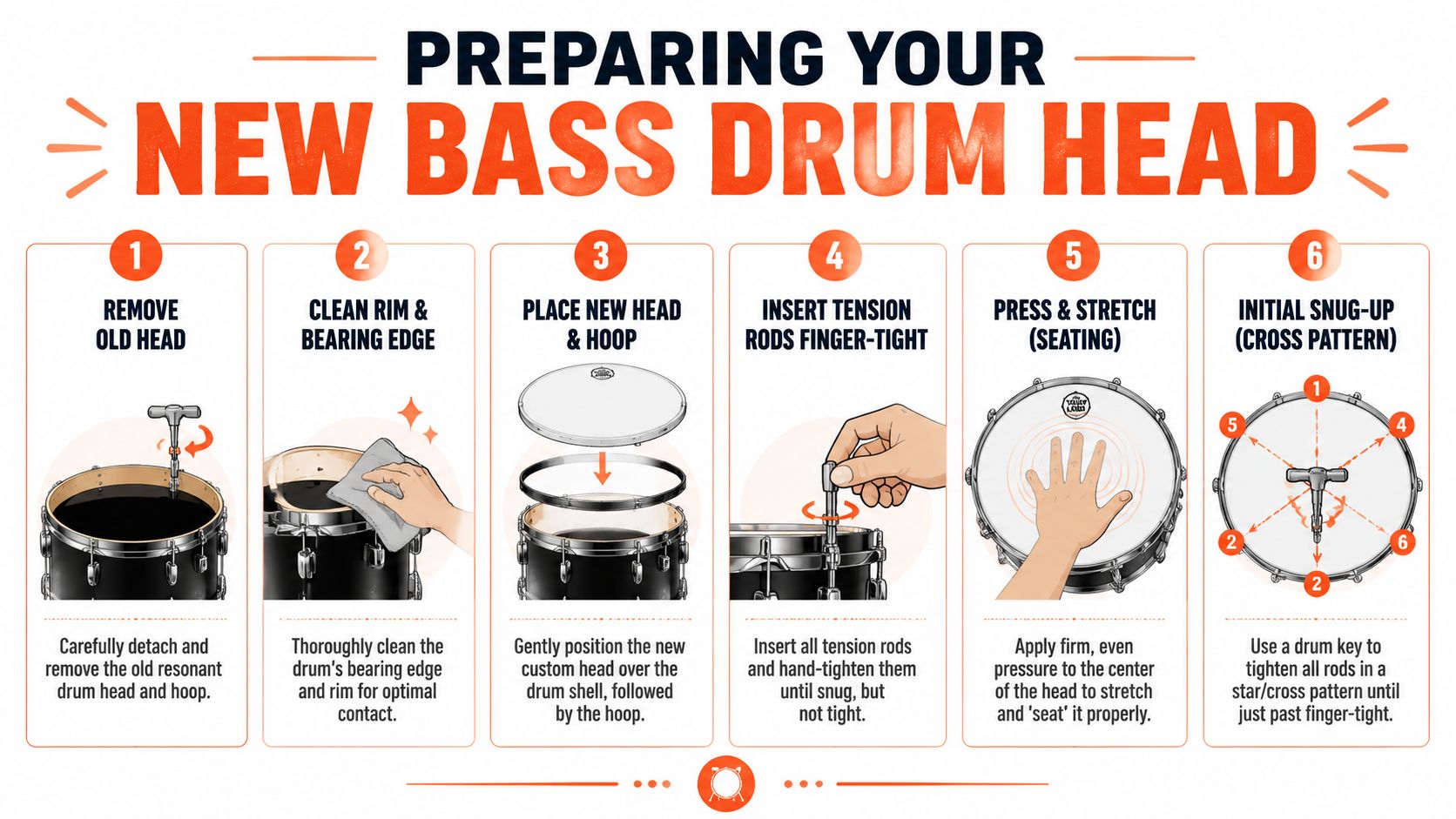
Install every tension rod and bring each one to finger-tight only. The goal here is simple. Remove slack without forcing any one side of the collar down ahead of the others.
Many printed heads encounter trouble under specific tuning conditions. One rod gets a few turns with the key too early, the hoop dips, and the image shifts slightly before the head has seated on the bearing edge. On a solid-color or text-heavy design, that small shift shows up fast.
Bring the rods up evenly by hand, then begin with small turns in a star pattern. Opposing lugs keep the load more even across the head, which helps the print sit flat and keeps the hoop from favoring one side.
A custom graphic often shows uneven seating before your ear does. If a circle looks oval or text starts to cant to one side, stop and reset.
Seating without rushing
Once the rods are finger-tight, press gently in the center with the palm of your hand. Use enough pressure to help the collar settle, not enough to force anything. A printed resonant head does not need rough treatment, especially if appearance is part of the job.
Then make your first passes with the key in small, matching increments across opposite lugs. I prefer slow quarter turns at this stage. It gives the film time to settle, and it makes it easier to catch a visual problem before tension builds.
A well-seated custom front head usually looks calm. The surface stays smooth, the logo stays true, and the drum gives you a better starting point once it is time to tune for pitch and resonance.
The Core Tuning Process for Your Resonant Head
The first real tuning pass decides whether that new front head will act like part of the drum or just sit there looking good. With a custom print, that matters more than people expect. A head can appear perfect from ten feet away and still feel stiff, papery, or slow under the mic.
Start at the wrinkle point, then come up gradually
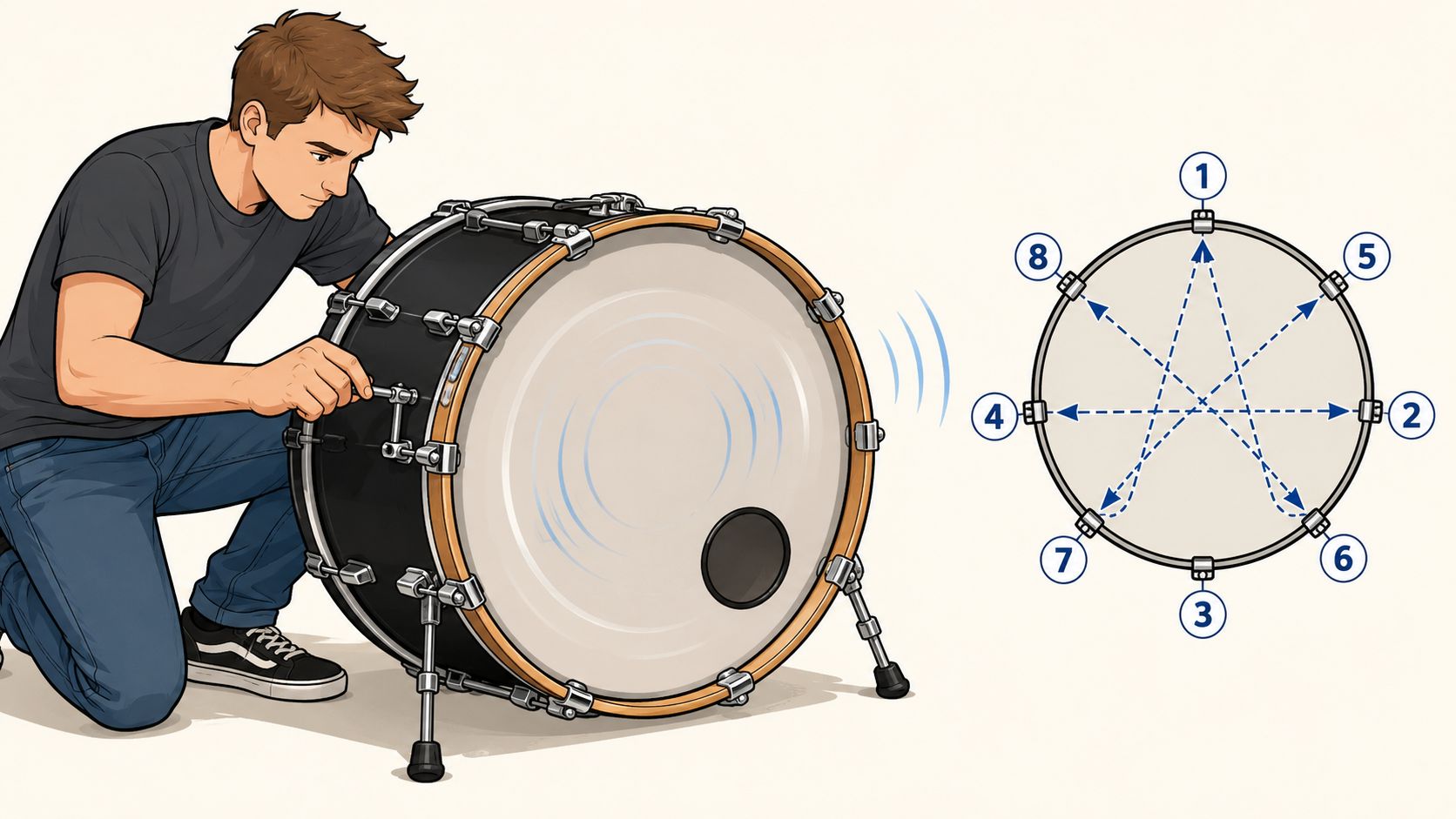
For most custom resonant bass drum heads, a low to medium tension range gives the best balance of tone and presentation. Start with the head at the point where the last visible wrinkles disappear, then bring each lug up in equal small turns. Many drummers end up around another turn or so per rod from that point, but the exact amount depends on shell depth, head film, muffling inside the drum, and whether the front head has a port.
That slower approach works for printed heads because it keeps the surface flat without choking the drum. Too much tension cleans up the look at first, but it can strip out the low note that makes the front head worth having in the first place.
Even lug pitch matters more than the named note
A resonant head can sound low and still be badly tuned. What matters first is consistency around the collar.
Tap lightly an inch or two in from each lug and compare those pitches to each other. Ignore the center of the head for this step. If one area jumps out as higher or duller than the rest, correct that rod in a small turn and check the opposite side again. On a custom head, I also watch the print while I do this. A circle in the artwork, a border ring, or straight text often reveals uneven pull before the drum fully gives it away by ear.
A good working sequence looks like this:
- Clear the last wrinkles: Bring the head just past slack so the film starts to speak.
- Make one full pass in a star pattern: Use small, equal turns at each rod.
- Tap and compare near every lug: Listen for spots that sit outside the group.
- Adjust the outliers only: Make small corrections instead of another big pass around the whole drum.
- Check the print from the front: Uneven tension often shows up as a slight wave or tilt in the design.
The goal is one cooperative surface with a clean note and a clean face.
Judge the result by feel, tone, and appearance
The wrong target is chasing all the punch from the resonant side. A front head pulled too high can look neat and polished, but the drum usually loses body and starts feeling smaller than it is. Leave it too loose and the opposite problem shows up. The logo ripples under light, the response gets floppy, and the microphone hears more loose attack than usable note.
| Approach | What usually happens |
|---|---|
| Too loose | The print can wave slightly, the note loses focus, and the front of the drum feels slow |
| Too tight | The surface looks firm, but the shell gives up low-end support and resonance drops off |
| Even, low-to-medium front tension | The artwork stays flatter, the note stays centered, and the batter head has room to define the attack |
The final check happens with the whole drum assembled and played at real volume. That is where room sound, muffling, and beater response tell you whether the front head is helping or getting in the way. If you want to optimize your drum’s signature sound after the print is installed, make those last small changes with the full setup in front of you, not with the drum sitting silent on its back.
Balancing Pitch and Tuning Around Your Mic Port
You hang the finished bass drum on the kit, step out front, and the logo looks perfect. Then the first few hits tell a different story. The note wobbles, the port side feels strange under the stick response, and the head that looked clean on the bench suddenly feels harder to tune in the room.
That usually comes down to two realities working at once. A custom resonant head has to present well from the audience side, and it has to release air in a controlled way once a port is cut into it. Good results come from balancing those jobs, not forcing the head to behave like a solid unported front.

The front head usually works better a little higher
On most setups, the resonant side responds best when it sits noticeably higher than the batter. Not cranked. Just high enough that the front head speaks clearly and gets out of the way of the beater stroke instead of dragging behind it.
That shift changes the feel of the whole drum. The attack stays defined, the note tightens up, and the shell keeps more of its shape in the sound. If both heads sit too close together in pitch, the drum can get puffy and slow. If the front head goes too high, the drum starts losing size and low-end support, which is a bad trade if the printed head already draws attention and needs to justify itself sonically.
The mic port changes the tension map
A port breaks the head’s symmetry. One section of the film has less material, less resistance, and a different decay pattern. Expecting every lug around that cutout to produce the same character is what gets people into trouble.
Use the lugs near the port as a local balance check, not as a place to chase a matching note at all costs.
- Match behavior, not perfect sameness: The lugs around the port should feel controlled and related to each other, even if the tone near the hole is shorter or drier.
- Avoid overcorrecting the port side: Extra turns next to the cutout often make the artwork pull unevenly and can choke the front head faster than you expect.
- Watch the print while you listen: On a custom head, stress around the port often shows up visually before it becomes obvious in the sound.
- Test from the audience side: A head can seem fine from the throne but show a warped logo or tension pull once you stand in front of it.
I see this a lot with logo-heavy designs. A drummer hears a slightly different pitch near the port, tightens that area to “fix” it, and ends up distorting both the response and the graphic. The better move is to keep the head even overall, then judge the drum by how the full note behaves under real playing.
Port placement affects both the mix and the artwork
The cutout does more than make room for a microphone. It changes how the drum breathes, how the front head settles, and where visual tension collects in the design. A port placed close to dense print can make minor tuning errors easier to see because the eye catches any stretching, tilt, or bunching around the artwork.
That is why I like to treat tuning and layout as one decision. If the port sits near a main logo element, tune with extra restraint in that quadrant and make smaller moves than you would on a plain black head. If the design leaves more open space around the cutout, you usually have a little more room to shape the feel without making the front look stressed.
For a closer look at placement trade-offs before finalizing a design, review these bass drum port considerations. The best custom resonant heads do both jobs well. They read clean from the floor and speak clean into a mic.
Troubleshooting Common Custom Head Tuning Issues
You finish the setup, step out front, and the logo looks right. Then the drum gives you a short, papery note, a stray rattle, or a front head that seems to change every time the room changes. That usually points to a small tuning or seating problem, not a bad print job.
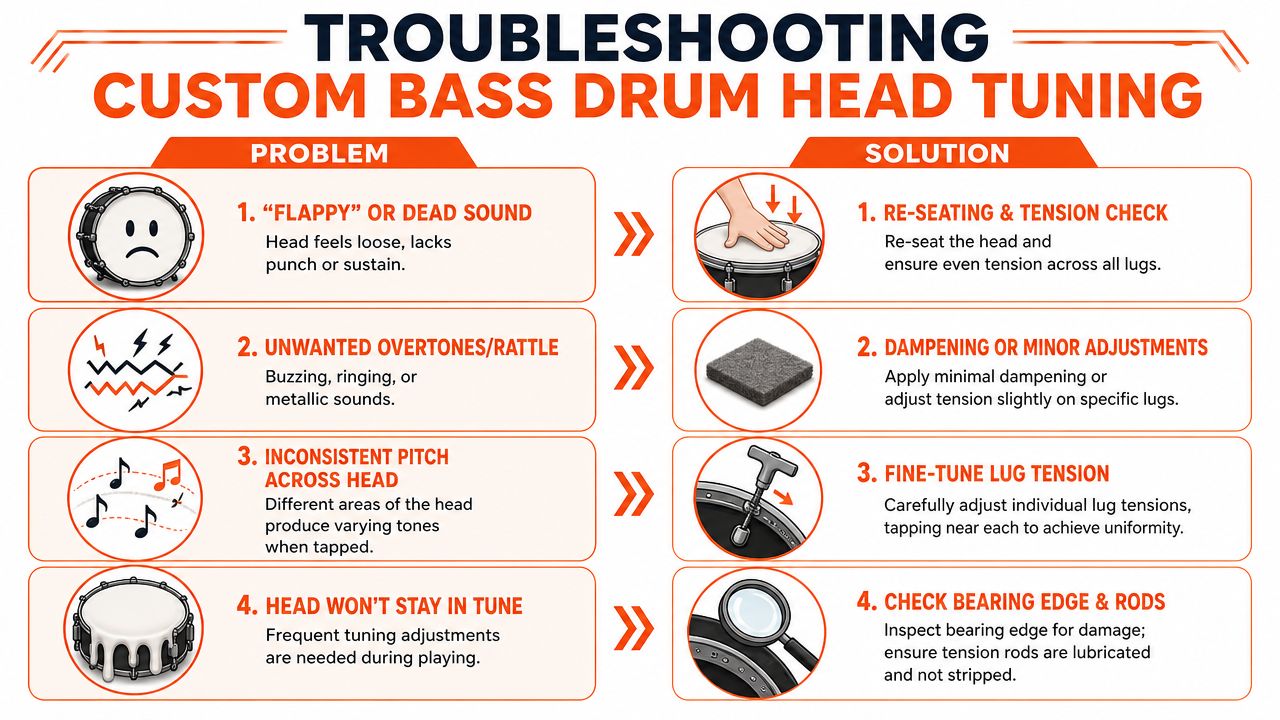
Custom resonant heads add one extra layer to troubleshooting. On a plain head, you can chase a tension mismatch by ear and never notice what it did to the front of the drum. On a printed head, the artwork shows the mistake fast. Slight bunching near a logo, a curve that was supposed to be straight, or a wrinkle near the port often tells you where the tension went wrong before your ear fully catches it.
The other common mistake is listening to the attack instead of the note that follows. The little click near a lug can fool you into tightening one area too much. What matters is the way the full head sustains after the beater strike. If the note opens up evenly and dies off cleanly, you are close.
Quick fixes that solve most problems
| Problem | Likely cause | Practical fix |
|---|---|---|
| Flappy or dead sound | Head is too loose, or one side never seated cleanly | Back off slightly, check that the collar is sitting flat, then bring the lugs up in small equal turns |
| Persistent ring or rattle | A single lug is out of line, loose hardware is vibrating, or the port edge is contributing noise | Mute suspect hardware with a finger while testing, then make tiny tension changes before adding any muffling |
| Logo looks slightly wavy | Uneven hoop pressure, off-center mounting, or overtightening near a printed focal point | Loosen in small steps, re-center the artwork visually, and retighten with lighter moves than you would use on a stock head |
| Drum won’t stay stable | Tension rods are dragging, the hoop is not pulling evenly, or the head film is past its useful life | Clean and inspect the hardware, check for smooth rod movement, then decide if the head is still worth tuning |
Ported heads deserve a closer look here. If the problem seems to live in the port quadrant, resist the urge to force that area to match the rest of the head exactly. A mic port changes how that section responds. The goal is a balanced front-head note and a clean-looking graphic, not identical feel at every lug.
A worn head can also waste a lot of tuning time. I see this in the print shop and behind the kit. A head can still look sharp from ten feet away while the film has lost its consistency, especially around an older port cut or a design that has seen a lot of transport. If the collar will not settle, the pitch drifts back right after adjustment, or the head responds unevenly no matter how carefully you tune it, check when to replace your bass drum head instead of forcing another round of fixes.
A good custom resonant head gives you two clear signals. The drum speaks with a controlled, usable note, and the artwork sits flat without looking pulled off axis. If one of those is off, troubleshoot both together. That is how a front head ends up sounding as professional as it looks.