A drummer finishes a band logo, drops it onto a 22-inch bass drum mockup, and gets the balance looking right. Then the same artwork goes onto a 20-inch head and feels crowded, while the 24-inch version leaves too much empty space around the mark. That’s a common problem when one fixed-size file is treated as the answer for three different kick drums.
Sizing a bass drum decal for 20, 22, and 24 inch kick drums works better as a matched-kit design task. The head diameter determines the working canvas, the visible logo footprint, the safe area, and the amount of adjustment needed around a mic port. The practical aim isn’t to make three unrelated graphics. It’s to make one identity keep the same visual weight across every head.
Why Sizing a Bass Drum Decal Matters Across a Matched Kit
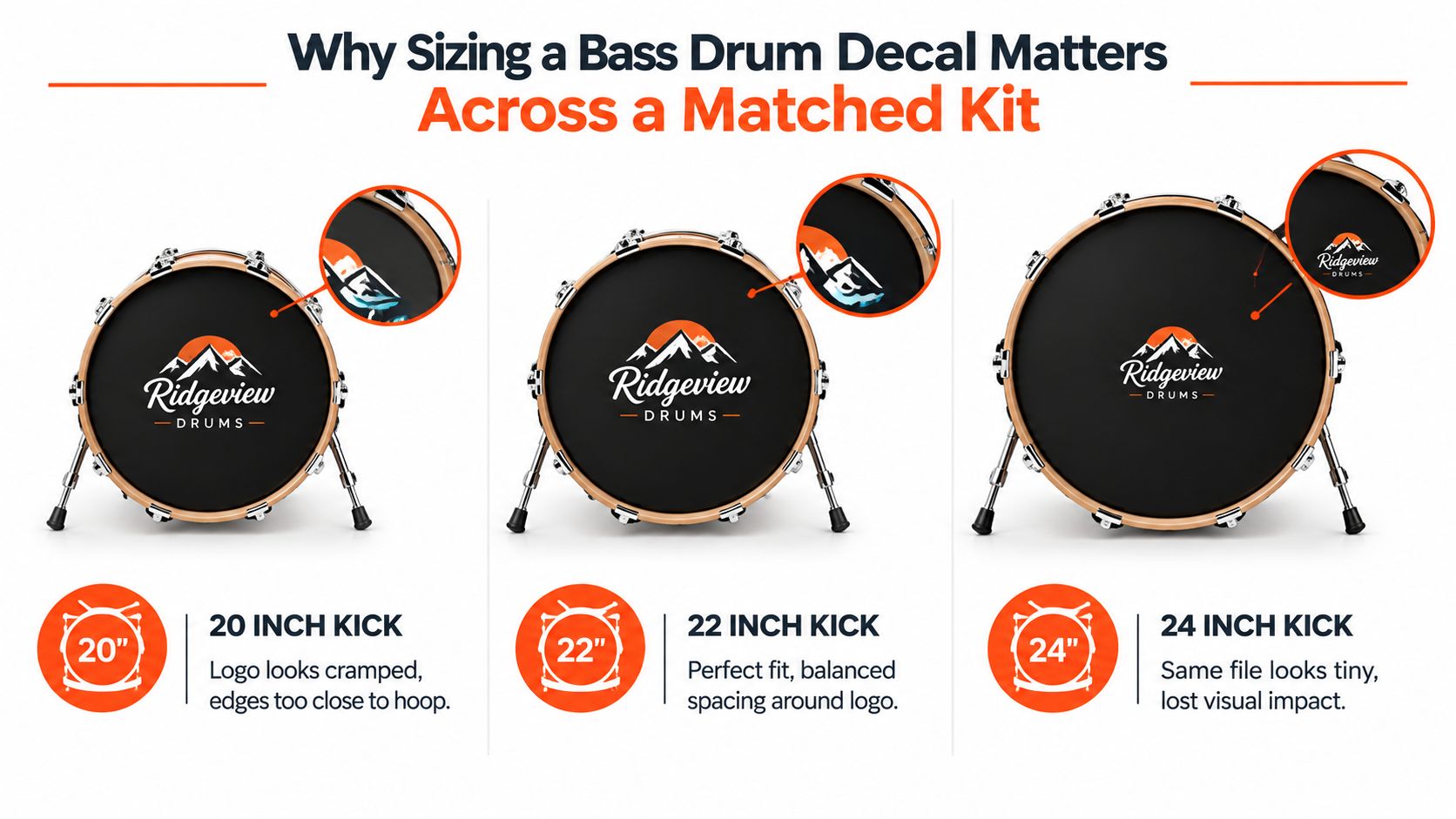
A logo exported for a 22-inch mockup can look perfectly proportioned until it’s placed on the other drums. On a 20-inch head, the same absolute width pushes lettering and fine details closer to the hoop. On a 24-inch head, that file occupies less of the available face, so the mark can look hesitant from the audience.
The fix is to preserve the relative footprint, not the original pixel dimensions. The most reliable sizing method is to measure the front head across its widest point, rim to rim, then choose artwork that matches that diameter. The industry guidance also makes an important production distinction, artwork should be scaled by drum diameter rather than reused at identical pixel dimensions across a set. Stafford Signs’ bass drum sizing FAQ describes the need to confirm each shell size and preserve the logo’s relative visual weight.
The 22-inch head is a reference, not a universal file
Many designers start with the middle size because it gives a useful visual reference. That’s sensible, but the 22-inch artwork should become a proportional master, not a file copied unchanged onto every head.
For a coordinated 20, 22, and 24-inch setup, the letter weight, spacing, corner shapes, and overall silhouette should remain recognizable. The actual logo width changes with the circle it occupies. A smaller head needs a little less absolute width, while a larger head needs more presence to avoid looking empty.
Practical rule: Build a separate layout for each diameter, then compare the three circles side by side before print approval.
That comparison catches problems a single-head preview hides. A kit looks intentional when the logo sits with comparable breathing room on each head. It looks patched together when one version is cramped and another appears undersized.
Measuring Your Drum and Confirming the Real Head Diameter
Bass drum heads are ordered by diameter, not shell depth. A 20-inch kick uses a 20-inch head, a 22-inch kick uses a 22-inch head, and a 24-inch kick uses a 24-inch head, regardless of how deep the shell is. A dedicated bass drum head size finder follows that diameter-first approach.
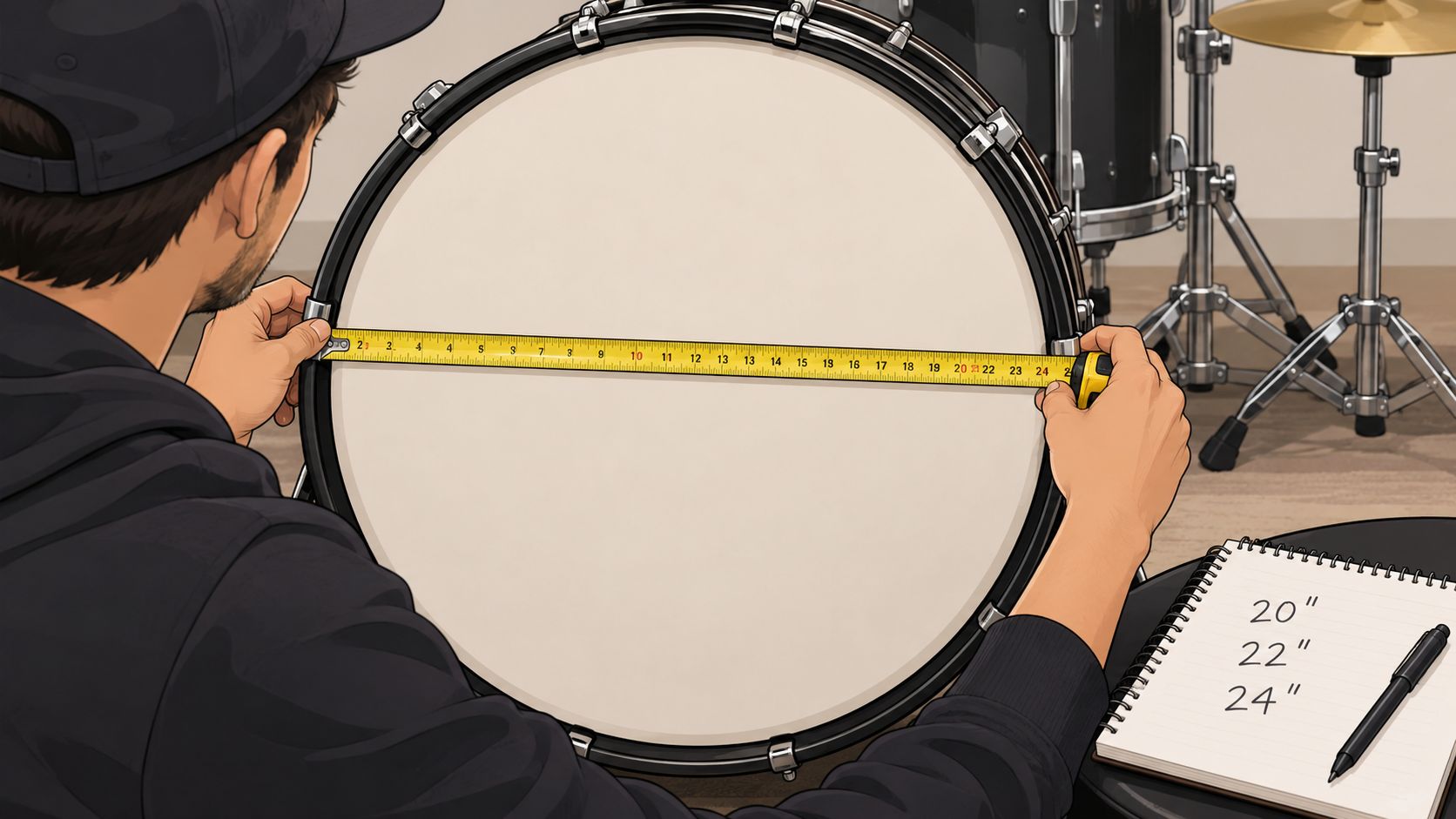
Start with the front head installed. Use a soft tape measure or a rigid ruler and measure rim to rim across the widest point of the head. Keep the measurement straight through the center rather than following the curve, and record the result before opening a design file.
Confirm the working diameter
The shell badge is useful, but it shouldn’t be the only check. Hoop construction, the bearing edge, and the way the head seats can affect the usable printed area by a small amount. For a nominal 20-inch, 22-inch, or 24-inch drum, the measurement should be close to that stated size, but the artwork still needs to follow the actual head format being ordered.
A practical verification sequence looks like this:
- Measure the installed front head rim to rim across the widest point.
- Round to the nearest inch when the measurement falls between standard formats. Common bass drum sizes include 18, 20, 22, 24, and 26 inches, as noted in this neutral drum-head measurement guide.
- Confirm the replacement head specification before building the artwork.
- Dry-fit the new head, then inspect the printed area inside the hoop.
- Write down the working diameter used for the final file.
Measure every drum in a multi-drum order. Two shells from the same series can still present slightly different working conditions, and the safest production file starts with a confirmed diameter for each head.
For practical measurement steps before designing, the guide to measuring drum heads keeps the process focused on the head rather than the shell depth.
Translating Diameter Into Artwork Dimensions and Pixel Sizes
Once the head size is confirmed, set the design document in physical inches. A 20-inch head should be built around a 20-inch circular artwork area, a 22-inch head around 22 inches, and a 24-inch head around 24 inches. Add bleed outside the trim boundary so the background extends beyond the finished edge instead of ending at the cut line.
The table below uses a 0.5-inch total bleed allowance, meaning the full file is one inch wider than the nominal head. At 300 DPI, that produces working widths of approximately 6,150 pixels for a 20-inch file, 6,750 pixels for a 22-inch file, and 7,350 pixels for a 24-inch file. Those figures are calculated from the physical dimensions in the table, so the printer’s template should take priority if it specifies a different canvas.
| Drum Size | Head Diameter (in) | Artwork Width With 0.5 in Bleed (in) | Pixel Width at 300 DPI | Recommended Visible Logo Diameter (in) |
|---|---|---|---|---|
| 20-inch | 20 | 20.5 | 6,150 | 6 to 10 |
| 22-inch | 22 | 22.5 | 6,750 | 6.6 to 11 |
| 24-inch | 24 | 24.5 | 7,350 | 7.2 to 12 |
Keep the visible mark inside the working circle
A finished decal is commonly made about 0.5 inch smaller than the nominal drum size, so a 22-inch order may have roughly 21.5 inches of actual coverage. That edge clearance helps the decal sit on the flatter part of the head instead of curling where the surface curves toward the rim. The custom bass drum decal sizing guide also recommends keeping critical elements 10 to 20 mm inside the finished edge, with at least 3 mm of bleed for clean finishing.
The visible-logo ranges in the table are deliberately practical rather than edge-to-edge. They support a centered, stage-readable mark while leaving room for the hoop and any port area. A large front-head logo often reads well at roughly 30% to 50% of the drum diameter, but the correct choice depends on letter density, contrast, and whether the artwork includes a background.
For broader print-layout context, a t-shirt graphic size guide can help designers think in terms of physical artwork area rather than whatever size happens to look comfortable on a screen. The same principle applies to custom bass drum head graphics, where the circle and its edge conditions matter as much as the logo itself.
Keeping the Same Logo Balanced on 20, 22, and 24 Inch Heads
The cleanest matched-kit workflow starts with one approved logo, then creates three diameter-specific layouts. The artwork isn’t redrawn from scratch, but it isn’t pasted unchanged either. Each version is scaled so the visible mark occupies a similar share of its head.
A useful set of proportional targets is shown below. The percentages are calculated from the target visible widths, and the pixel figures represent those widths at 300 DPI.
| Head Size | Target Visible Width | % of Diameter | Pixels at 300 DPI |
|---|---|---|---|
| 20-inch | 8 inches | 40% | 2,400 |
| 22-inch | 8.8 inches | 40% | 2,640 |
| 24-inch | 9.6 inches | 40% | 2,880 |
The 22-inch version works as the visual reference. The 20-inch logo becomes slightly narrower in absolute terms, while the 24-inch version grows enough to maintain comparable presence. The important part is that the percentage stays consistent, not that every file uses the same width.
Preserve the shape, not just the outer measurement
Uniform scaling keeps the broad silhouette aligned, but some logos need optical adjustment. Dense lettering can require a little more breathing room on the 20-inch head. A thin outlined emblem may need a stronger apparent presence on the 24-inch version, even when its measured width follows the proportional target.
Check these details across all three mockups:
- Letter spacing: keep the rhythm consistent, but don’t let the smallest head force letters together.
- Line weight: scale strokes with the logo so thin details don’t dominate on one size.
- Corner radius: preserve the character of rounded shapes after resizing.
- Optical center: center the visual mass, not merely the bounding box.
- Port clearance: shift the composition when a mic hole interrupts the strongest part of the mark.
The same relative-footprint principle appears in drumline bass drum head design guidance, where fixed-size artwork can feel crowded on smaller heads and underpowered on larger ones. A side-by-side review is more useful than judging each file in isolation.
Bleed, Safe Zones, and Mic Port Placement
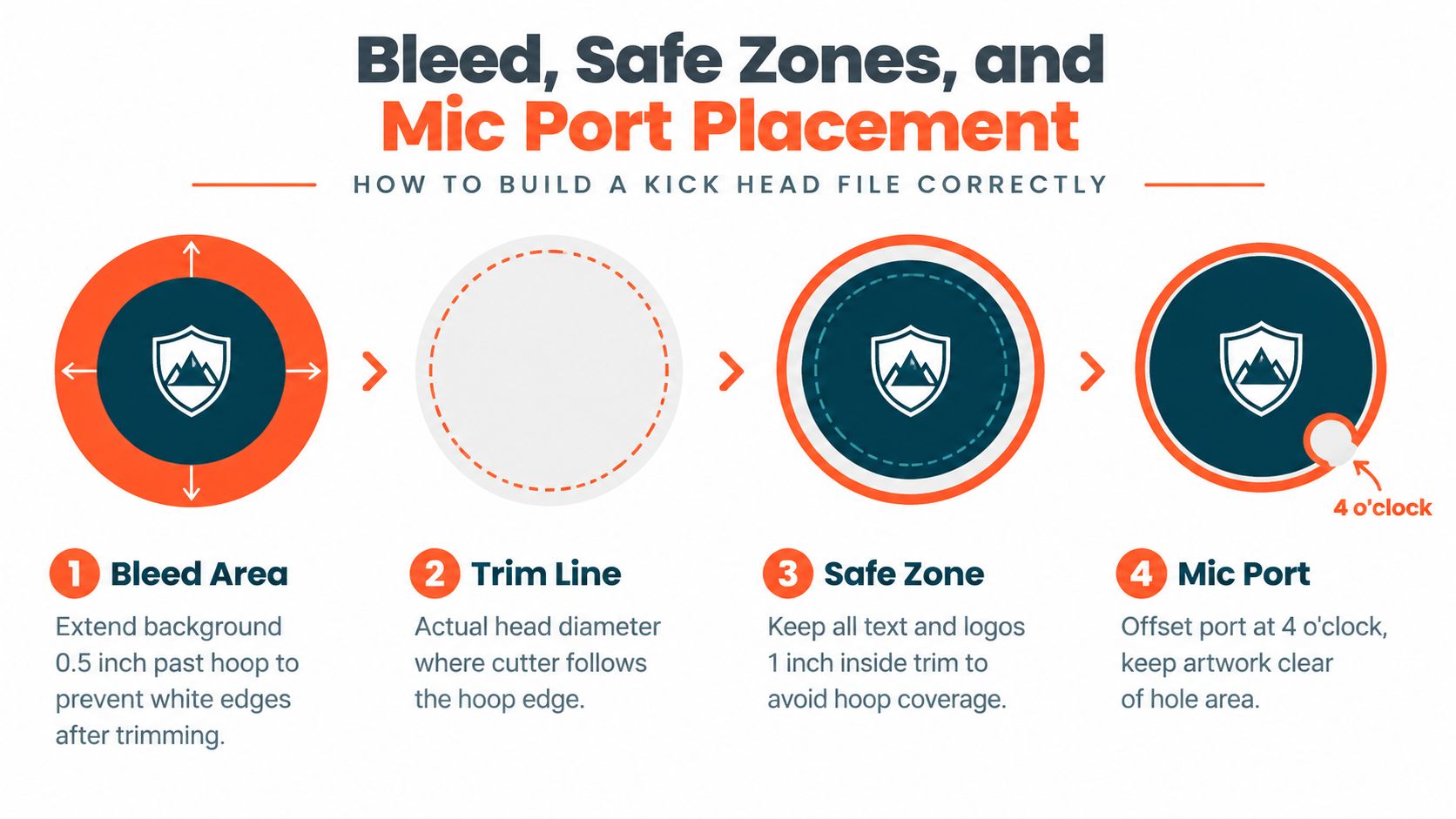
A print file has three useful circles: the bleed area, the trim line, and the safe zone. The bleed extends the background beyond the finished edge. The trim line represents the actual head diameter. The safe zone keeps important text, logos, and fine details away from the hoop and the curved perimeter.
For a kick head, a practical file can extend the background by about 0.5 inch beyond the nominal head boundary. Critical elements should stay roughly 1 inch inside the finished edge, while the decal itself should generally remain about 0.5 inch smaller than the nominal drum size so it sits on the flatter face. Those clearances matter more on larger heads because the outer area becomes less dependable for small details.
Build the port into the composition
A mic port is a design feature, not an afterthought. Common port choices include 4-inch and 5-inch diameters, and placement is often near the lower side of the head, around the 7 to 8 o’clock area when viewed from the front. The exact position depends on the kit, microphone access, hardware, and the printer’s available options.
Leave at least 0.5 inch of visual clearance around the port so the ring or reinforcer doesn’t collide with lettering or a high-detail graphic. The port should be marked on a non-printing guide or a clearly identified production layer, not left for the printer to guess.
Port placement changes the balance of the entire face. Center the logo first, place the port second, then adjust the artwork around the actual hole.
A centered guide keeps the main design aligned with the head. An offset guide shows the port’s location without letting the hole pull the logo off-center unnecessarily. For more placement considerations, the bass drum port basics guide keeps the focus on how the cutout interacts with a custom head design.
Preparing Your Files for a Clean Print Upload
A printer-ready upload removes uncertainty before production. Each head size should have its own file, built at the confirmed physical dimensions and labeled so the production team can identify it without opening every document.
The upload checklist
- One file per diameter: Export separate artwork for the 20-inch, 22-inch, and 24-inch heads at their full bleed sizes.
- Print resolution: Build raster artwork at 300 DPI at the actual print size. 150 DPI can be acceptable for fabric or vinyl heads when the printer specifies it, but lower resolution visibly softens edges.
- Color mode: Convert the document to CMYK when the production workflow requires press color. Check that effects created only in RGB haven’t changed during conversion.
- File format: A flattened TIFF or a press-quality PDF keeps layers, fonts, and transparency from creating surprises. Outline fonts when the workflow calls for it.
- Bleed and guides: Include the required bleed, and mark the mic port on a non-printing layer or separate spot color.
- Naming: Use a clear convention such as
BandName_22in_Front_v3. The same structure should identify every size in a multi-head order. - Final proof: Check spelling, safe-zone clearance, port placement, and the pixel dimensions before upload.
A custom drum head artwork preparation guide can be useful when a logo contains transparency, fine line work, or multiple type treatments. The central rule remains simple, the document’s physical size and its export settings must agree.
Five uploaded-file problems that cause avoidable rework
1. Trusting the nominal shell size without measuring the head.
The symptom is a file that fits the advertised size but doesn’t align with the actual working area. Measure across the bearing edge and confirm the head format before opening the artwork.
2. Designing at screen resolution.
A logo looks sharp on a monitor but prints with softened edges or jagged curves. Rebuild the file at 300 DPI in physical inches, or use vector artwork that scales cleanly.
3. Sending exact cut size with no bleed.
The finished head can show a narrow unprinted sliver near the perimeter if the background stops exactly at the trim line. Add at least 0.25 inch of bleed on every side, unless the printer’s template specifies another requirement.
4. Centering the logo without accounting for the mic port.
The mark may technically be centered, but the port ring can cut through a letter, illustration, or important negative space. Shift the safe composition roughly 3 to 4 inches off-center when needed to clear the port, then verify the result in the mockup.
5. Reusing one file across all three diameters.
The 20-inch version looks cramped, or the 24-inch version loses impact. Scale the visible footprint separately for each head using the matched-kit targets rather than copying one fixed-size file.
The production team should receive files that make the intended result obvious. A file named for its diameter, built with its own bleed, and checked against the port location protects both the artwork and the purchasing decision.
From Correct Artwork to a Stage Ready Custom Bass Drum Head
A stage-ready front head starts before the upload. The measured diameter determines the canvas. The separate artwork layout preserves the logo’s visual weight. Bleed protects the background at the trim edge, the safe zone keeps details away from the hoop, and the mic-port guide prevents hardware from competing with the design.
The contrast is easy to see in a matched kit. A logo sized to the full visible area of a 20-inch head can feel undersized when transferred unchanged to a 24-inch head. A logo adjusted for each diameter keeps its presence consistent from the front row, whether the head carries a band name, school emblem, worship-team identity, studio mark, or personal illustration.
DIY vinyl methods can be useful for temporary projects, and a guide to DIY decal methods for vinyl offers background on that approach. A professionally prepared custom head follows a different path, with the artwork planned for the actual circular head, its edge conditions, and its port placement rather than applied as a separate piece after the fact.
Custom Bass Drum Head lets customers upload artwork, position it in a browser preview, specify the head size, and review the design before production. That workflow reduces the need to rebuild the sizing math for every order, provided the buyer still confirms the diameter and checks each size-specific mockup carefully.
The finished kit should look like one visual system, not three files that happened to print together. Correct sizing is what separates a smooth approval from a preventable round of corrections, and it gives the drummer a front head that looks deliberate under stage lights.
Custom Bass Drum Head offers custom-printed heads for uploaded logos, photos, illustrations, and band graphics, with size-specific layouts and mic-port placement built into the design process. Visit Custom Bass Drum Head to create and review the 20-inch, 22-inch, or 24-inch version of a matched kick-drum design before ordering.