
A lot of drummers reach the same point Alex did. The band finally has a real logo, the songs are tight, the dates are getting better, and the front of the kick drum still looks like a blank rental kit.
That gap matters more than people expect. A custom bass drum head doesn’t just fill empty space. It turns the kit into part of the band’s identity. The hesitation usually isn’t about the idea. It’s about the process. People worry that ordering online will feel risky, technical, or hard to control.
It doesn’t have to feel that way. A modern drum head designer is built to move in a straight line, from artwork file to proof to final print, without guesswork. The key is understanding what happens at each stage, and what to check before clicking approve.
From an Idea to the Stage
Alex had a common problem. The band had booked its biggest show so far, and everything looked ready except the kit. The bass drum still had a plain front head, which meant the stage setup didn’t match the posters, social graphics, or merch table.
A custom head sounded like the right move. The doubt came a second later. How does someone make a custom bass drum head online without getting stuck in design jargon, file issues, or a final product that looks different from the screen?
That’s the part most first-time buyers need to hear. The online ordering process is no longer a custom-shop mystery. It’s usually a short browser workflow where the drummer chooses the size, uploads artwork, places details like text or a port, reviews a live mockup, and approves the design before production begins. For anyone wanting ideas before starting, it helps to see our custom design portfolio.
Why this feels easier than expected
The biggest change is visibility. Instead of sending an email and hoping the print comes out right, the buyer sees the layout taking shape on screen.
That’s what gave Alex confidence to keep going. The project stopped feeling like “ordering a physical product blind” and started feeling like placing a design exactly where it belonged on the drum.
Practical rule: The less guessing involved before checkout, the more relaxed the order feels.
What this guide follows
Alex’s order is a useful example because it tracks the same questions most buyers have:
- What needs to be ready first: drum size, artwork, colors, and head type.
- What happens in the designer: file upload, placement, background choices, and port location.
- How the proof removes anxiety: especially when there’s concern about sharpness or scaling.
- What happens after approval: production, shipping, and what to do if the delivered head doesn’t match the approved design.
Gathering Your Assets for the Perfect Design
Before Alex opened any bass drum head designer, there were a few things to confirm. That prep work made the ordering part faster and much less stressful.
What to have ready
Three pieces of information matter most at the start:
- Drum size: Measure the bass drum correctly before ordering. The size affects the printable area and how large the artwork can appear.
- Artwork files: A logo, illustration, photo, or text graphic should be ready to upload.
- Color decisions: Background color, text color, and whether the head should look clean, dark, bright, or transparent all shape the final look.
If Alex had skipped that step, the designer would have felt harder than it needed to. With those details ready, it became more like arranging a poster than solving a production puzzle.
File type confusion, simplified
Many buyers pause at this point. They have a logo, but they don’t know if it’s “good enough” to print.
A simple way to think about it is this:
| File type | Best use | What to know |
|---|---|---|
| PNG or JPG | Photos or simple artwork | Fine for many designs, but quality depends on the original file |
| PDF or SVG | Logos and text | Better for sharp edges when scaled larger |
| Other accepted formats | Existing design exports | Useful if the original artwork came from design software |
One published guide notes that online custom bass drum head tools commonly accept PNG, JPG, PDF, SVG, EPS, and TIFF, and support sizes from 16 inches up to 28 inches while showing a live mockup before approval in a 4-step process through the browser (custom bass drum head ordering guide).
What Alex checked before moving on
Alex used a short checklist:
- Logo version: The band had both a social-media screenshot and the original file. The original file was the safer choice.
- Text readability: Small text might look fine on a laptop but disappear from a stage.
- Background decision: A dark logo on a dark head would need adjustment before upload.
- Ownership: The buyer should have rights to the submitted artwork.
For anyone still unsure about file prep, this guide to perfecting drum head artwork helps clarify what usually prints cleanly and what tends to cause trouble.
Better prep doesn’t make the process more complicated. It removes the moments where the buyer has to stop and second-guess every choice.
Using the Online Bass Drum Head Designer
Once Alex had the file, the size, and the general look in mind, the actual design stage moved quickly. That’s where the phrase make your own drum head design online starts to make sense. It’s less like placing a vague order and more like building the layout in plain view.
A modern browser-based workflow usually follows the same pattern: choose the head size, upload artwork, place text or a port, review the mockup, then approve it for production. That approach is standard because it keeps the buyer focused on visible decisions instead of hidden production steps.
The four decisions that shape the design
Alex worked through the order in a simple sequence.
-
Choose the head type
The first decision was whether the order was for the front resonant side or another use case. That matters because the visible layout and practical needs can differ. -
Set the artwork placement
Alex uploaded the band logo and resized it until it felt balanced. A centered logo can feel formal. A slightly higher placement can leave room for a mic port or lower text. -
Place the mic port and any extra text
This step matters more than people expect. A port changes the usable design area, so the layout should work around it instead of fighting it. -
Review the live mockup
This is the moment when the design stops being abstract. The buyer sees how the full head should look before anything moves forward.
Why placement matters
A drum head isn’t a flat poster board. The outer edge near the hoop and the area that interacts with hardware can make placement more sensitive than it first appears.
A robust online workflow treats the designer as a constrained layout tool, not just an upload box. One published drumhead workflow describes the approval process as confirming the head type, logo and port-hole placement, and artwork before finalizing the order, while also noting that vector artwork such as SVG or PDF is preferable for logos and text because it stays sharp when scaled.
A logo can be perfectly designed and still look awkward if it’s placed too close to the edge or forced around a port at the last minute.
What Alex actually saw on screen
Alex uploaded the logo, tested a few sizes, then shifted it slightly to keep the bottom line of text clear of the planned port hole. That small move solved what could have become the biggest visual problem on the finished head.
For buyers ready to try the process themselves, they can use our online drum head designer to upload a file, adjust placement, and preview the layout directly in the browser. Some buyers also like browsing a broader custom drum kit design tool article first, especially when they want the full kit aesthetic to line up with the front head.
One useful mindset during the design step
Alex stopped treating every click like a permanent commitment. That helped. The designer stage isn’t the point of no return. It’s the stage for checking balance, trying a placement, and making sure the design feels right before proof approval.
That’s what removes most first-time buyer anxiety. The layout becomes visible early.
Reviewing and Approving Your Digital Proof
This was the moment Alex had worried about from the start. The uploaded logo looked fine on screen, but would it still look sharp on a large bass drum head?
That fear is normal. Buyers aren’t only asking whether the design looks cool. They’re asking whether the final physical product will match what they think they bought.
What the proof is really for
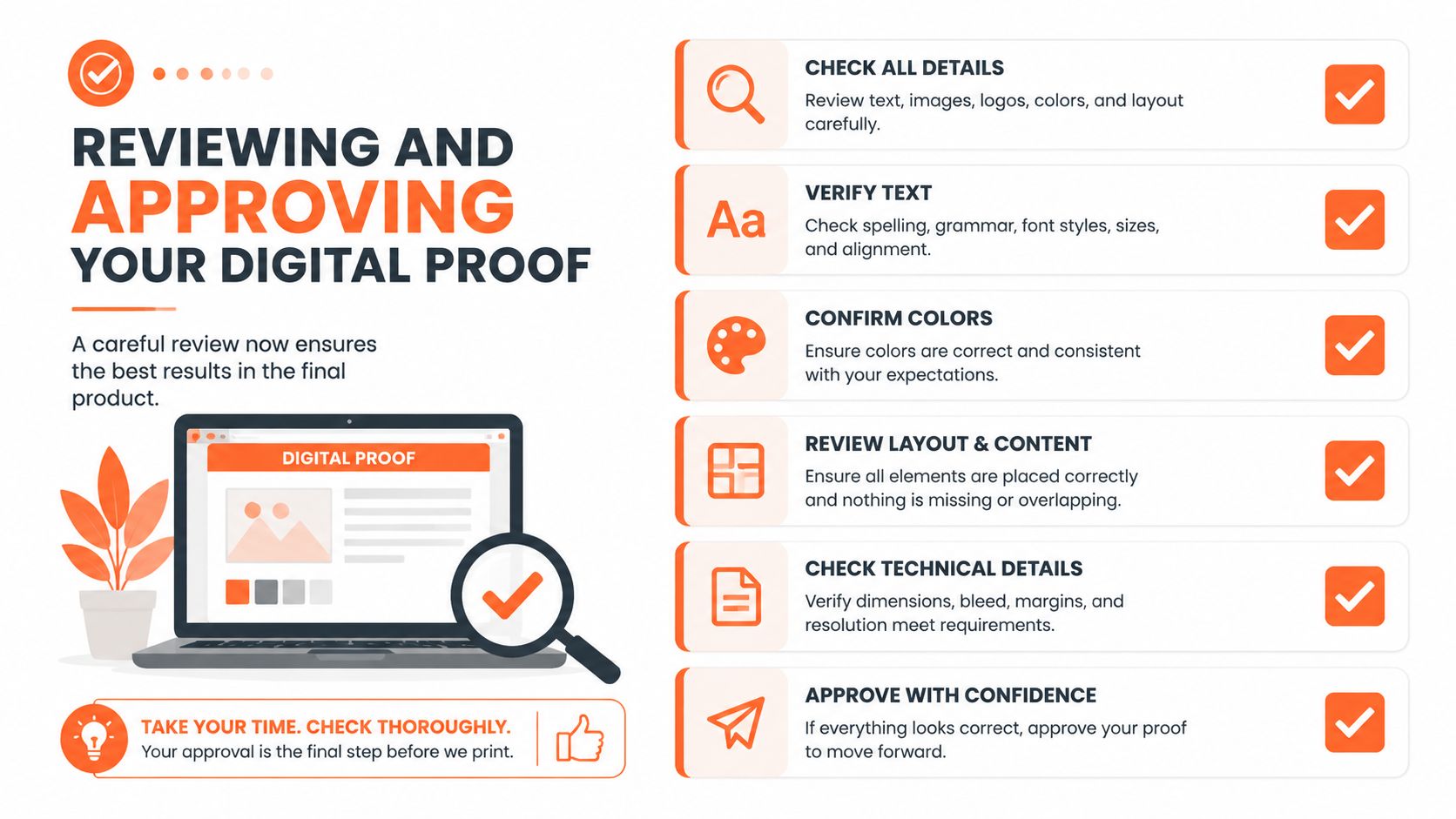
The proof is the buyer’s control point. It’s where the design gets checked at the size and layout that matter, before production begins.
Alex looked at three things first:
- Sharpness: Did the logo edges still look clean?
- Placement: Was the artwork sitting where it should relative to the port and outer edge?
- Color expectation: Did the overall contrast feel right for stage use?
When the file is strong, this step feels reassuring. When something needs adjustment, it’s far better to catch it here than after printing.
How Alex’s biggest concern got resolved
Alex’s logo included thin line details. On a small laptop preview, everything seemed okay, but there was still that nagging thought that enlargement might soften the edges.
The digital proof solved that anxiety because it gave Alex a to-scale view of the final concept. Once the details were visible in proof form, the worry changed from “What if this prints blurry?” to “This is the version going forward.”
Nothing should move into production until the buyer is comfortable saying yes to the proof.
What to check before approval
This is a good point to slow down for a minute. Approval shouldn’t be rushed.
- Confirm the head type: Make sure the order reflects the intended drum head.
- Check port-hole placement: A misplaced port changes both function and appearance.
- Look at spacing: Text or logos too close to the edge can feel cramped.
- Verify artwork clarity: Logos and typography usually stay cleaner when the uploaded file is vector-based.
For buyers comparing vendors, a good question is whether proof review is treated as a real checkpoint or just a formality. This piece on how to find a drum head printer helps frame that decision.
A practical ordering workflow should also include a revision path or satisfaction process if the delivered head doesn’t match the approved design. That protection matters because it ties the proof to the final product. Approval builds confidence only when the printed result is expected to match it.
Finalizing Your Order and Production Timeline
Once Alex approved the proof, the creative part was done. The order became a production job.
That shift is useful to understand because it changes the buyer’s role. Before approval, the focus is visual. After approval, the focus is accuracy, handling, and delivery.
What happens after approval
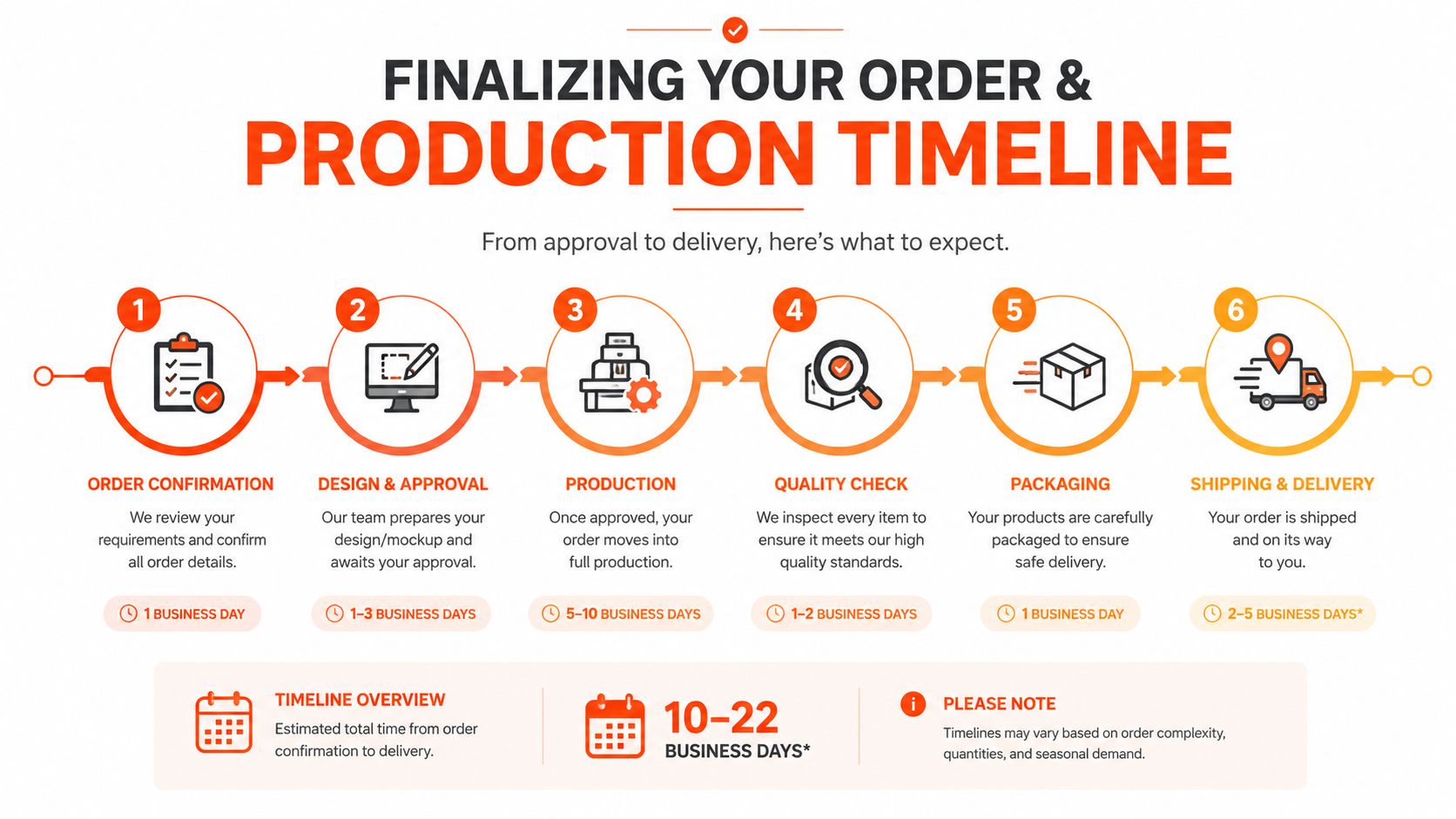
The order usually moves through a straightforward sequence:
- Order confirmation: The approved design is attached to the final order details.
- Production prep: The file is prepared for printing based on the approved proof.
- Printing: The artwork is produced on the drum head using the selected process.
- Packing and shipment: The finished head is protected and sent out using the chosen shipping option.
At this point, buyers usually want two things. They want a clear production timeline, and they want to know what happens if the delivered item doesn’t match the approved proof.
Questions buyers often ask here
| Question | What matters most |
|---|---|
| When does production start? | After proof approval |
| Can shipping speed vary? | Yes, depending on the selected shipping option |
| What if something arrives wrong? | Contact the printer and compare the product to the approved proof |
Some providers, including Custom Bass Drum Head, describe a workflow where the buyer designs and approves the head in the browser before production. For anyone budgeting the order, they can view our drum head pricing.
The smartest way to think about the timeline is simple. Production starts after approval, not after the first upload.
If the delivered head doesn’t match the approved proof, the buyer should reach out right away and reference that proof. A clear revision or satisfaction process gives the order real accountability.
From Our Door to Yours The Unboxing Moment
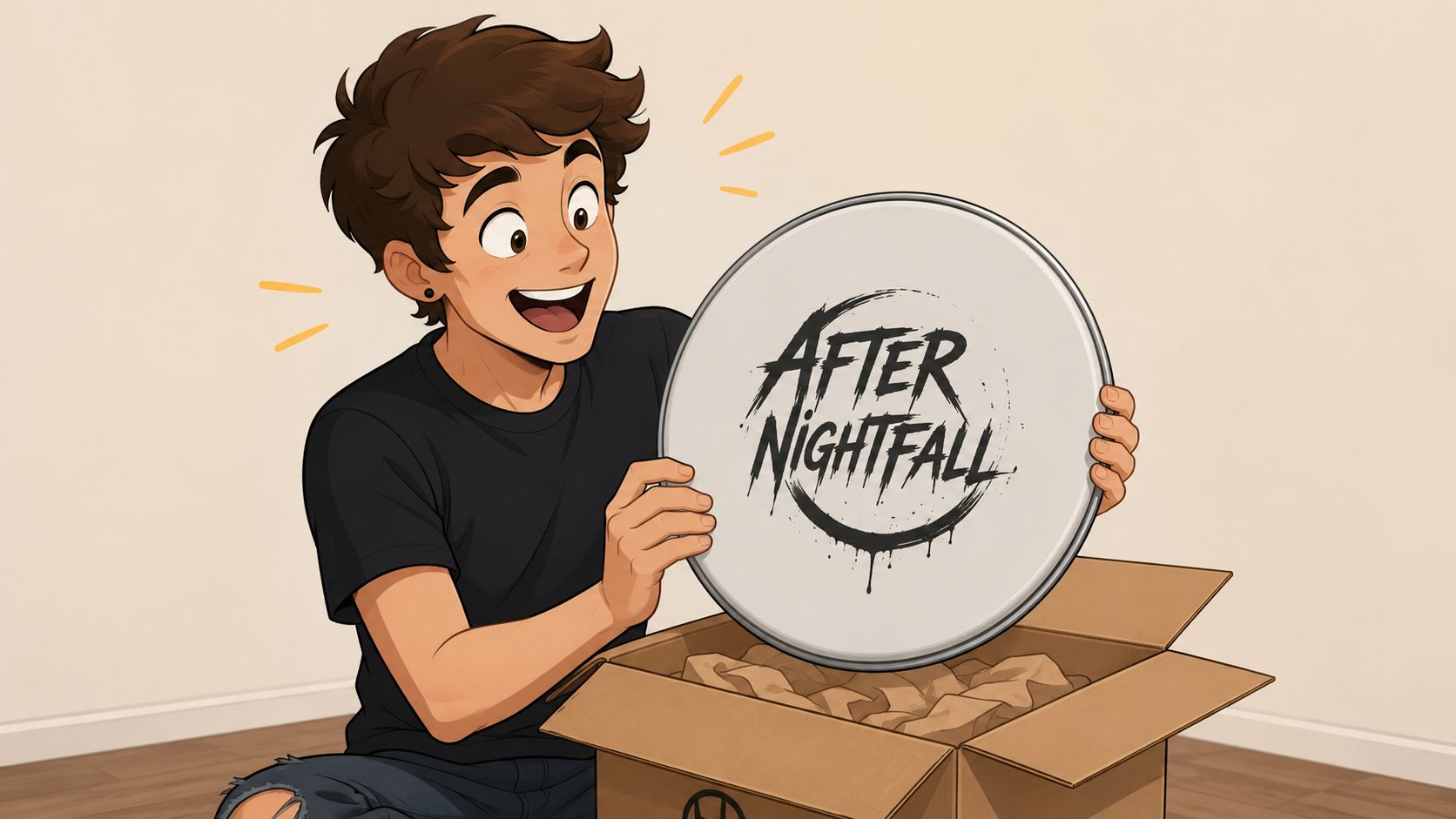
A few days later, Alex had the package in hand. By then, the doubts were gone. The only question left was whether the finished head would feel as good in person as it had looked in proof.
The reaction was immediate. The logo looked clean, the placement felt intentional, and the whole piece looked like part of the band rather than an add-on. That’s the payoff buyers are usually hoping for when they start this process. Not just a printed object, but a bass drum head that belongs with the music, the brand, and the stage setup.
Why the finished head feels different in person
On screen, a custom head is a design file. In the room, it becomes presence.
Alex mounted it on the kick and the kit stopped looking generic. The front of the bass drum now carried the same identity as the flyers and the streaming artwork. That’s why a custom drum head often feels worth it even before the first note of the set. It changes how the whole setup reads from the audience side of the room.
The quiet benefit buyers remember later
Appearance is often the initial draw. Many end up appreciating the certainty just as much.
Alex never had to wonder whether the final print would be a surprise, because the design had already been checked, proofed, and approved. That’s what makes ordering a custom bass drum head online feel manageable for first-time buyers. Each stage answers one question before the next one begins.
A custom bass drum head should feel exciting, not risky. If a drummer is ready to upload artwork, review a proof, and order with confidence, Custom Bass Drum Head offers a browser-based way to build the design, approve the layout, and move from blank front head to finished stage look.