The studio has a session booked, the band’s artwork is approved, and the engineer asks for a kick sound that stays consistent from song to song. The choice of custom kick drum heads for recording now affects more than the front-of-kit appearance. Port location, head construction, damping, and microphone access all become part of the session setup.
A custom head can give the kit a clear visual identity for tracking, livestreams, videos, and press images. It can also make microphone placement more repeatable, but only when the graphic decision follows the recording plan. The resonant head is the primary visual face of the kit and the surface most visible in live streams and video recordings, so it usually carries the design while the batter head handles the beater impact.
What a Custom Head Actually Changes in the Studio
A drummer arrives with a finished logo on a front head. The engineer wants more attack, less bloom, and a microphone position that can be repeated across several songs. The printed artwork matters to the band, but the recording result depends first on the relationship between the resonant head, the port, the damping, and the microphone.
Studio recording moved from a largely single-microphone approach toward multi-microphone close miking by the early 1990s. That change made kick-drum head design more important for control, attack, and isolation, while the rise of recording-focused kits, including the YD9000 introduced by Yamaha in 1977 and later known as the Recording Custom, reinforced the value of hardware designed around studio work. The broader history is outlined in this technical overview of capturing a kick drum.
The custom order therefore starts with three decisions:
- Which head carries the graphic? For most sessions, the resonant head gives the band the visible identity without placing artwork where the beater repeatedly strikes.
- Will the resonant head be ported? A port can provide direct access for an internal microphone, while an unported head preserves a continuous front surface and supports outside-the-head placement.
- Where will the graphic sit around the microphone opening? A logo can remain legible beside or above a port, but the design should never force the engineer into an awkward mic angle.
The head itself doesn’t guarantee a particular recorded tone. Shell depth, tuning, beater choice, room acoustics, damping, microphone selection, and the engineer’s processing all contribute. The useful approach is to treat the custom head as a studio tool with a branding surface, not as decoration added after the acoustic decisions. A practical guide to the related variables appears in this resource on bass drum tone.
Practical rule: Approve the port and microphone plan before finalizing the artwork. A beautiful logo in the wrong position can make the session less flexible.
Batter vs Resonant Head and Where the Graphic Goes
The batter and resonant heads serve different jobs, so the graphic should follow visibility and workflow rather than symmetry. The batter head receives the beater impact and strongly influences the initial attack. The resonant head faces the audience, interacts with the shell’s front opening, and provides the surface most likely to appear in a camera frame.
For a 22-inch kick with an outside microphone positioned near the resonant side, the front graphic remains visible and the engineer can frame the microphone around the design. If the session uses an internal microphone through a port, the port becomes part of the composition. A logo can sit above, below, or to one side of the opening, depending on the desired camera view and the drum’s hardware.
Artwork on the batter head is usually wasted for a visible band identity. The drummer blocks much of that surface, and repeated beater contact exposes the design to wear that doesn’t help the recording. A plain, properly tensioned batter head can handle its acoustic role while the custom resonant head carries the logo, album artwork, sponsor mark, or studio identity.
| Factor | Batter Head | Resonant Head |
|---|---|---|
| Primary job | Receives beater impact and shapes the initial attack | Controls the front-facing response and supports the mic relationship |
| Camera visibility | Usually limited during performance | Primary visual face of the kit |
| Graphic use | Generally inefficient for visible branding | Suitable for logos, artwork, and clearly positioned marks |
| Port decision | Normally not the front microphone access point | Porting options can be specified when ordering |
| Recording priority | Attack, impact, and interaction with internal damping | Mic access, front-head response, sustain, and visual presentation |
The graphic still needs enough clear space around the rim, tension rods, and port. Fine lettering can lose readability when it is reduced to fit the circular surface, while a strong silhouette or high-contrast wordmark tends to remain clear under studio lighting. The custom drum head artwork guide helps translate a finished logo or illustration into a usable head design.
The tone doesn’t come from the graphic alone. Ink coverage, color, and finish shouldn’t be treated as substitutes for choosing an appropriate head construction or mic setup. The practical division is simple: put the visible identity on the resonant head, then specify its acoustic access around the recording plan.
Ported vs Unported Resonant Heads for Recording
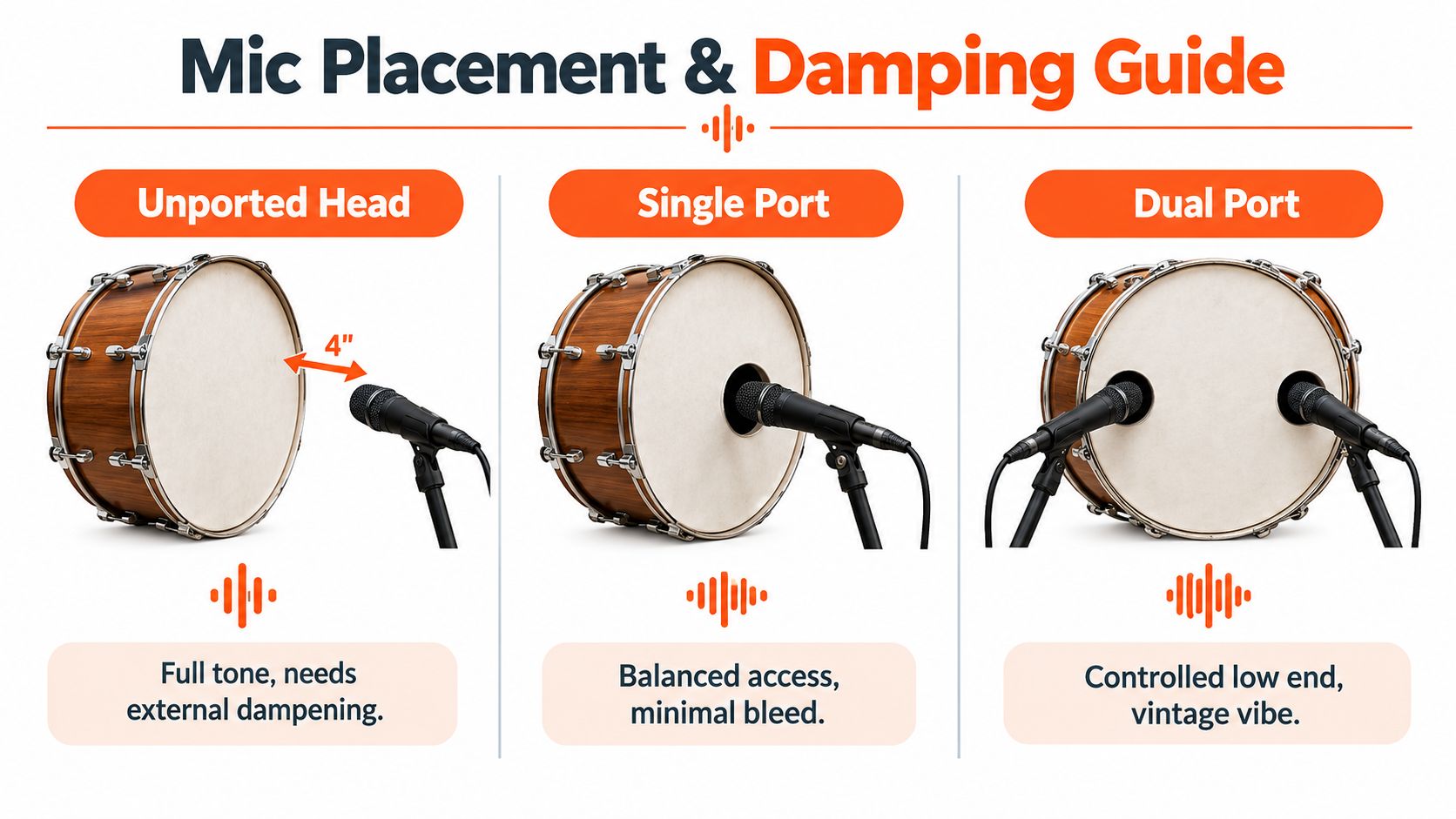
An unported resonant head gives the engineer a continuous front surface and keeps the microphone outside the shell. A common starting position is 4 to 6 inches from the resonant head, slightly off-center, for a balanced sound. Moving the microphone closer to the beater increases definition, while moving it farther away increases low-end contribution, although the final result still depends on the complete drum and room setup. These starting points are discussed in this bass drum recording guide.
A ported head changes the workflow by creating a fixed entry path. For an internal microphone, a useful starting point is 2 to 4 inches inside the port, aimed toward the beater when more attack is needed. Moving it deeper can increase click, while pulling it back and angling it away can produce a fuller result. The microphone shouldn’t point directly at the drum’s center, which can be a less useful-sounding position. The placement process is described in this guide to finding a kick-drum sound with multiple microphones.
A port doesn’t automatically make a head better for recording. It gives access and can reduce sustain, but it also commits the engineer to a particular path through the front head. A smaller or strategically placed port can retain more of the resonant surface while still allowing precise microphone access. A larger opening may suit a production that needs quick internal-mic placement, but the artwork then has less uninterrupted space.
Use the recording plan to choose the port
For a studio-only setup, an unported head often gives the engineer more freedom to move the microphone across the front of the drum. That can be useful when several songs need different balances between body and attack.
For a kit that moves between tracking, live streams, and stages, a ported head can make the internal microphone setup faster and more repeatable. A two-microphone approach can also pair an inside microphone for attack with an outside microphone for low end, so the front head doesn’t need to be over-ported to solve every recording problem.
The bass drum port basics guide is useful when deciding how the opening should support both the graphic and the microphone. The right choice is the one that matches the sessions the drummer records, not a blanket preference for ported or unported heads.
Mic Placement and Damping Around a Custom Resonant Head
Once the resonant head is chosen, the microphone plan should be written into the order notes. A ported head puts the microphone path on the front of the drum, while an unported head keeps the microphone outside and makes the front surface part of the acoustic filter.
For a ported setup, start with the inside microphone 2 to 3 inches inside the port, then adjust by ear and by the needs of the track. A microphone aimed toward the beater emphasizes attack. Pulling it back or turning it away generally gives the engineer a broader starting tone. An outside microphone can sit several inches in front of the resonant head and angle toward the center, but the final position should be tested against room reflections and bleed.
With an unported head, begin outside the front head. Industry guidance commonly places an internal microphone 2 to 4 inches from the batter head when access is available, while an unported setup is often captured 2 to 3 inches from the front resonant head for a rounder result, as described in this historical recording reference. Those are starting points, not promises about the finished sound.
Match damping to the head choice
Damping should be adjustable rather than permanently assumed in the artwork order. A felt strip can reduce unwanted movement at the head, a small piece of gel on the batter can shorten sustain, and a pillow or other internal material can control the shell response. Extra damping reduces resonance, while moving an outside microphone farther back can also tame the kick without changing the drum itself. One recording guide notes that approximately 3 feet of microphone distance can be used as a resonance-control move, so the engineer has alternatives beyond adding more material inside the shell. That guidance appears in the bass drum recording tutorial, which has already been linked above and is not repeated here.
Tuning should be documented alongside the artwork, but exact tension-rod counts aren’t universal. A 22-inch kick can have different hardware, head construction, shell response, and target pitch, so a fixed rod-count instruction would create false precision. The order note should instead state the intended relationship, such as a batter that supports the song’s low register and a resonant head tuned above it, then leave the engineer room to confirm the result in the actual room.
The printed port edge also affects access. A dark graphic around the opening can make the microphone and cable harder to see on camera, while a high-contrast border can make the opening read as an intentional design feature. Keep the area immediately around the port clear enough for practical handling, especially when the engineer needs to reposition the microphone quickly.
For more detailed setup ideas, use this microphone placement guide for bass drum recording. The best custom order leaves room for adjustment instead of baking one untested tone into the design.
Ordering a Custom Head That Works for Recording
A recording-focused order should contain two briefs in one document. The first describes the sound the drummer and engineer need. The second describes the artwork, dimensions, colors, and port treatment. If either side is missing, the head may arrive visually correct but awkward for the session, or acoustically suitable but unusable for the band’s visual identity.
Prepare the artwork at final size
Vector artwork is the safest choice for logos, lettering, and clean line work. Raster artwork suits photographs and textured illustrations, but it should be prepared at 300 DPI at the intended final print size, according to this custom drum head artwork preparation guide. Physical artwork is often scanned at 600 DPI before being edited down to a 300 DPI final export, which can preserve detail during the editing stage.
Build the file at the actual circular print area rather than enlarging a small square image later. CMYK is preferred for reducing screen-to-print color shifts, and round artwork should be supplied in the actual circular shape rather than a square layout, as explained in these bass drum artwork specifications.
Leave breathing room around the rim, tension rods, and port. A central logo that looks balanced in a rectangular design tool can feel crowded once it is clipped by the circular head or interrupted by a low offset port. Ask for a mockup that shows the complete head, not only the artwork file.
Specify the head and the port separately
The head size follows the shell diameter. Common bass drum sizes run from 16 inches to 28 inches in one detailed sizing guide, while front resonant options are also offered across a broader 16-inch to 32-inch range, with 20-inch, 22-inch, and 24-inch fronts common on modern kits. The sizing information is covered in this custom bass drum head sizing guide.
Don’t describe the desired sound only as “tight” or “big.” Those words mean different things to different engineers. State whether the session needs internal mic access, a rounder outside-mic tone, shorter sustain, a defined beater attack, or flexibility across several songs. Include a reference track if the engineer and head supplier use the same description of the target.
| Specification | Requirement |
|---|---|
| File type | Vector for logos and line art, raster for photos and textured artwork |
| Raster resolution | 300 DPI at the final print size |
| Color preparation | CMYK preferred for more predictable print color |
| Layout | Actual circular print shape with safe space around hardware and the port |
| Head position | Resonant for visible branding, batter only when the playing-side design is intentional |
| Port information | Diameter, placement, and whether the opening must support an internal microphone |
| Tonal brief | Desired balance of attack, body, sustain, and damping flexibility |
Head weight, ply count, and coating should be selected with the supplier’s available specifications, not guessed from the artwork. A lighter or heavier construction can change how the head behaves, but the result still depends on tuning, shell, damping, room, and microphone position. The order should therefore identify the recording context rather than promise a guaranteed frequency response.
Review the mockup for three things: logo readability from the camera position, unobstructed port access, and enough margin for the rim and hardware. If the head is needed for a fixed session date, allow practical lead time for approval, production, delivery, installation, and a short setup check. A fresh head should be installed early enough that the drummer and engineer can confirm the port, tuning, damping, and camera appearance before tracking begins.
For a broader evaluation of ordering considerations, see this guide to choosing a custom drum head printing service.
Visual Consistency for Streams, Videos, and Press
A recording head often appears in more places than the final audio session. The same resonant head can sit behind a live-stream camera, appear in a music video, fill the background of a press photograph, and face the audience at a later show. That continuity gives the band a recognizable visual anchor without requiring a different design for every production.
The port should be part of the composition. A centered logo with an opening through its most important lettering may look broken in an overhead shot, while an offset port can preserve the wordmark and still provide mic access. Porting options can be specified when ordering so the head serves both mic access and graphic display needs.
Finish matters under lighting. A matte surface can reduce distracting reflections in a video frame, while a glossier appearance may produce stronger highlights under stage lights. The practical choice depends on the camera, lighting, and desired visual style, so the design proof should be checked under the kind of light used for the shoot.
Durability also belongs in the buying decision. A 10 mil head is described in the supplied product guidance as suitable for shipping, road cases, and repeated setups, with the expectation of resisting color shift or delamination. That makes construction part of the visual plan, especially for bands that move the same kit between studios, rehearsal rooms, and venues.
The graphic shouldn’t compete with the microphone, kick hoop, or hardware. Strong contrast, clear spacing, and a port that looks intentional usually produce a more professional frame than dense artwork that fills every available inch.
Your Next Move From Mockup to Studio-Ready Head
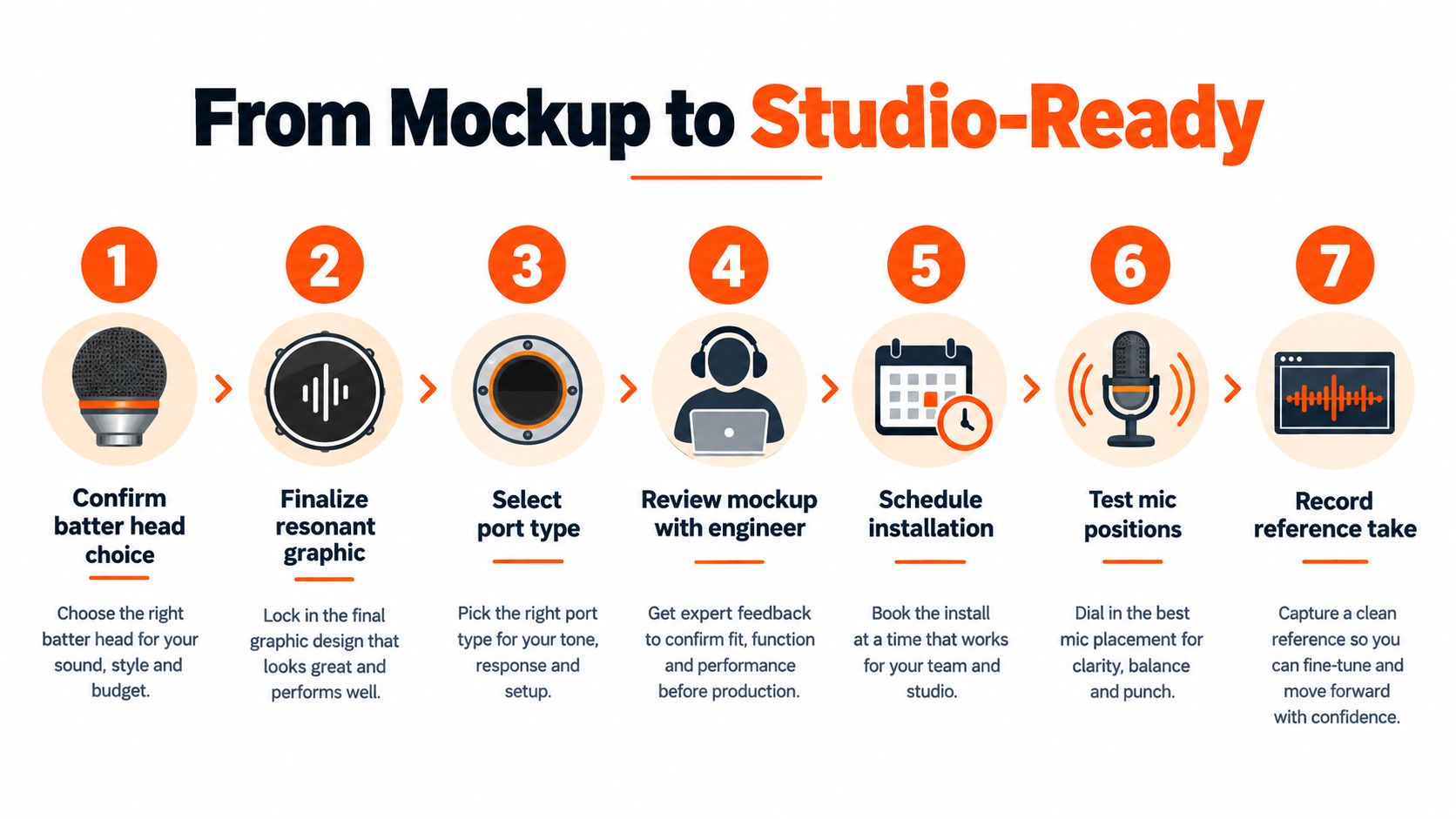
A session-ready custom head can be ordered with a short, focused checklist. Each decision should remove one possible problem before the drum reaches the studio.
- Confirm the head position. Put the visible identity on the resonant head unless there is a specific reason to print the batter side.
- Lock the port plan. Decide whether the head is unported or ported, then specify the opening’s size and offset around the microphone and logo.
- Set the artwork to the dieline. Use the actual circular print dimensions, not a small image that will be enlarged later.
- Check resolution and bleed. Keep raster artwork at the required final-size resolution, preserve safe margins, and inspect lettering near the rim or port.
- Write the tonal note. Include the intended balance of attack, body, sustain, damping, and internal or external mic access.
- Review the mockup with the engineer. Check the camera view, cable access, port visibility, and the amount of clear surface around the microphone.
- Schedule a setup check. Install the head early enough to test mic positions, damping, tuning, and the finished graphic before the recording day.
A spare can be sensible for touring or a multi-camera production, but the primary head should still be tested in the actual recording environment. The purpose isn’t to force one permanent kick sound. It’s to arrive with a head whose graphic, port, and construction support the engineer’s available choices.
Custom Bass Drum Head lets buyers upload logos, photographs, gradients, illustrations, or fine line artwork, review a browser mockup, and specify a front or batter head with a selected port position. Visit Custom Bass Drum Head to start the recording-focused mockup while the studio requirements are still clear.