
A band has a release show coming up, the stage photos will be everywhere, and the plain front head suddenly looks unfinished. The logo exists as a file on a laptop, but turning that artwork into a clean, durable bass drum head involves more than pressing print and hoping the colors match.
Bass drum head printing works best when the design, head construction, viewing distance, microphone port, and production process are considered together. A professional result should look sharp from the back of the room, survive regular handling, and arrive ready for installation without forcing the buyer to redesign the artwork at the last minute.
The Custom Bass Drum Head Printing Workflow
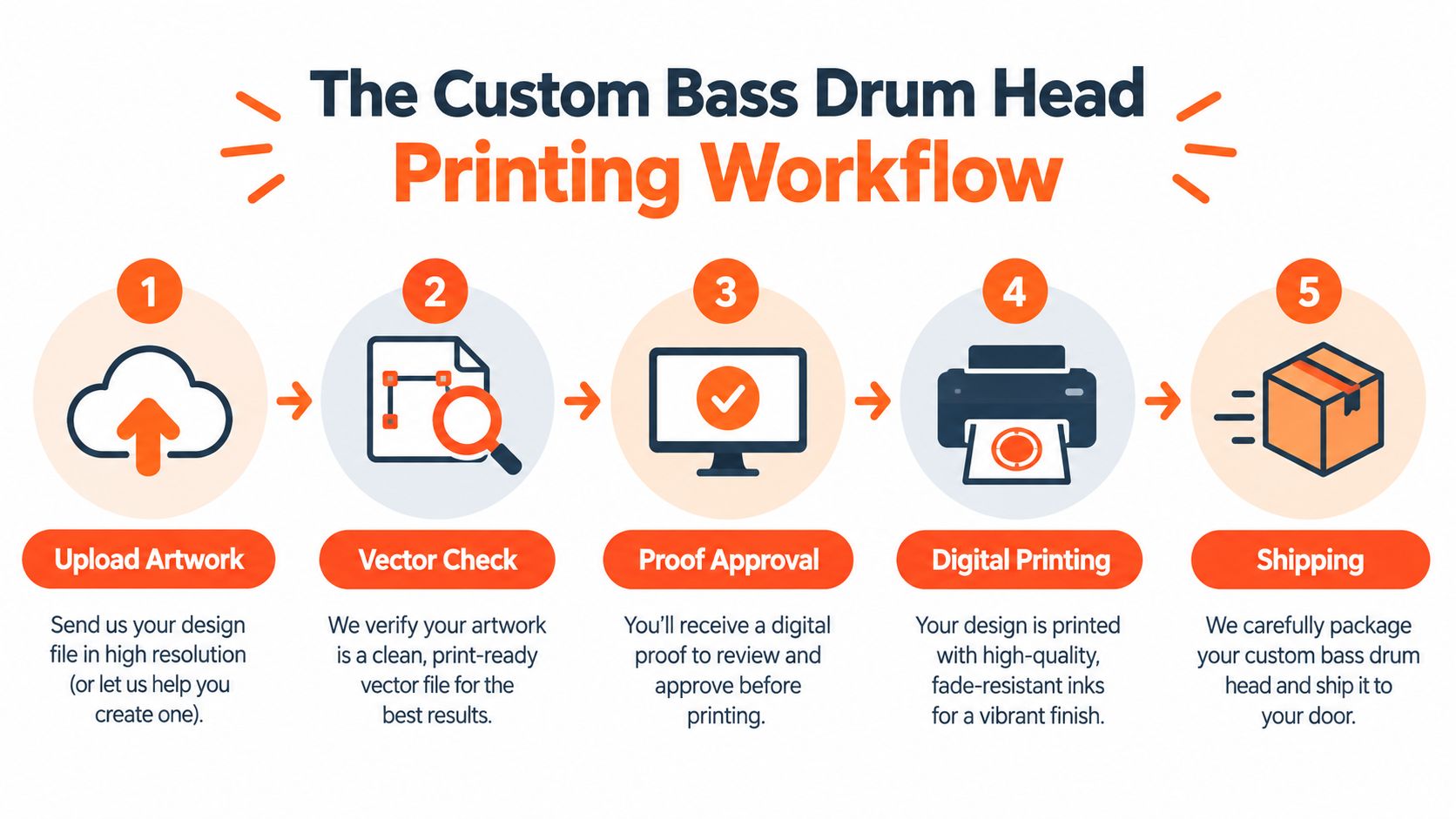
A typical order starts with a band uploading its logo, a teacher preparing matching heads for a school ensemble, or a solo artist adapting album artwork for the front of a kit. The artwork is checked against the selected head size and layout, then positioned so the important parts of the design remain visible around the hoop and any microphone port.
From upload to approval
The first practical distinction is between an artwork upload and a production-ready file. A logo might be supplied as a vector file with clean, scalable paths, while a photograph or social-media graphic may arrive as a raster image. Both can work, but the file needs to be assessed at the finished drum-head diameter, not judged only by how crisp it looks in a small design window.
A digital preview then shows the customer how the composition sits on the circular head. This design proof or preview is part of the order process, and customers should approve it before printing begins. The proof is the opportunity to catch a cropped letter, an incorrectly positioned face, an overly dark background, or a microphone port that would cut through the central mark.
Practical rule: A proof should be reviewed as a physical layout, not just as a pretty screen image. Check the outer edge, the safe area, the port position, and the visual balance of the complete circle.
What happens after approval
Once the file is approved, the production team prepares the artwork for the exact head substrate. The printer is calibrated, the file is processed for the chosen surface, and the graphic is printed onto the head rather than treated like an ordinary sheet of paper. The ink then receives the validated curing or fixation treatment before the head is inspected, packed, and shipped.
Turnaround depends on artwork complexity, proof revisions, head availability, production scheduling, curing requirements, inspection, and delivery distance. A simple logo that arrives in a usable format can move faster than a large photograph requiring layout changes and color review. Tour dates, studio sessions, and album launches should be planned around the full order cycle, with time reserved for proof approval rather than treating approval as an automatic step.
Preparing Artwork for Stage Visibility and Scale
A bass drum head is a large circular sign viewed under difficult conditions. Audience members may see it from the back of a venue, through haze, beneath colored lights, or partly behind cymbals and toms. Artwork that looks impressive on a bright monitor can lose its hierarchy when the smallest text and lowest-contrast details are viewed at stage distance.
Choose the right file type
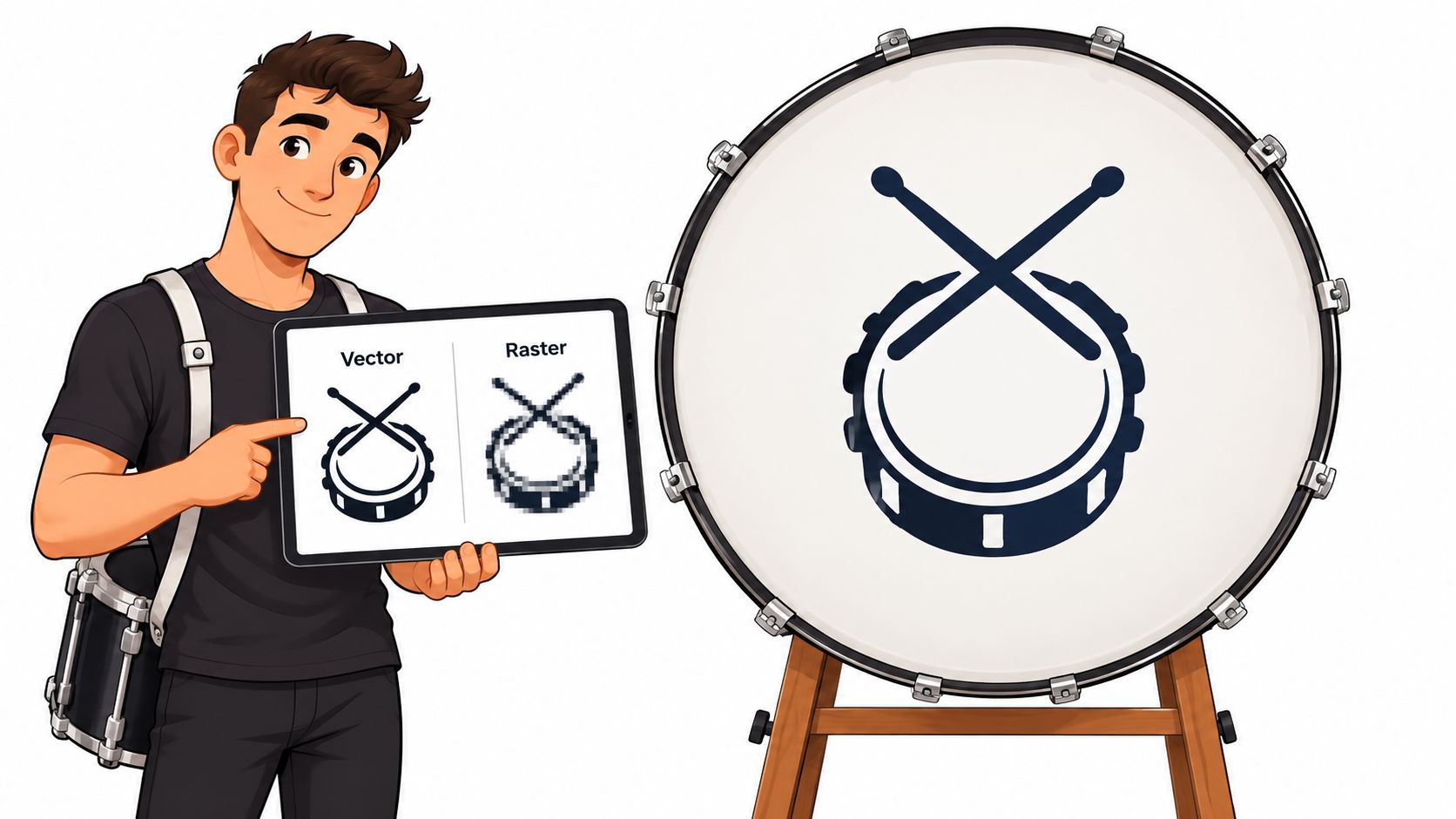
Vector files produce sharper results than raster images at drum head print sizes. That matters most for band names, geometric logos, thin outlines, and illustrations. Vector artwork describes shapes mathematically, so it can be enlarged to the head’s finished size without the soft edges and visible pixels that can appear in a small raster file.
Raster artwork still suits photography, painted artwork, and textured illustrations. The file should be evaluated at its final output size and expected viewing distance. Large-format guidance identifies 100 to 150 PPI for graphics viewed from 5 to 10 feet and 50 to 100 PPI for displays viewed from more than 20 feet, rather than treating 300 PPI as a universal requirement. See the large-format artwork guidance on resolution and viewing distance when deciding whether a photograph has enough usable detail.
Test the design like an audience member
A reliable review process includes more than checking file dimensions:
- View at distance: Stand across the room and check whether the name, symbol, or main subject still reads.
- Test low light: Reduce screen brightness and inspect the design in grayscale. If the logo disappears in grayscale, colored stage lighting may cause the same problem.
- Protect the hierarchy: Make the primary mark larger and stronger than supporting textures, credits, or decorative detail.
- Allow for the circle: Keep important information away from the outer edge, where the hoop and viewing angle can reduce clarity.
- Plan around the port: Create alternate versions for left, right, high, or low microphone-port positions instead of moving the port after the composition is finished.
Bleed protects full-coverage backgrounds from producing an unwanted white edge. Typical large-format guidance cites 0.125 to 0.25 inches of bleed, but the printer’s template should take priority because the finishing process and head construction determine the exact requirement. The background should extend beyond the visible trim while names, faces, sponsor marks, and contact details remain safely inside it. More ideas for preparing a usable design appear in this guide to drumline bass drum head artwork.
How Digital Files Become Finished Drum Heads
Modern drum heads commonly use a smooth polyester film rather than animal skin. Polyester film was developed in England during the 1940s, later commercialized in the United States under the Mylar name, and became valuable for drum-head construction because it creates a stable, smooth, nonporous surface that tolerates humidity and temperature changes better than calfskin. The material’s consistency also makes it suitable for repeatable graphic decoration, as explained in this history of drum-head materials and construction.
The printing surface still needs to be treated as its own production condition. A generic print setting may not reproduce the same tonal density on every synthetic membrane because surface color, surface energy, ink absorption, and curing behavior affect the final result.
Why surface preparation matters
The printable face is cleaned and conditioned before production. A small compatibility and adhesion test can reveal whether the chosen ink system wets the film properly and bonds after curing. This step matters particularly with low-surface-energy plastics, where pigment may sit on top of the material instead of forming a dependable bond.
A professional workflow typically includes:
- Printer calibration, so the equipment is operating consistently.
- Substrate characterization, using the actual head material and coating rather than an assumed profile.
- Test patterns, including gradients, fine lines, stepped density, and dark areas.
- Validated curing, using the energy or temperature window suited to the ink and substrate.
- Mechanical checks, such as rub, tape, flex, and edge-abrasion tests.
The result should be a graphic that remains bonded while the head vibrates, is handled during installation, and travels between venues. Increasing ink density alone isn’t a durability strategy. Over-inking dark artwork can create drying or curing problems, while poor nozzle condition can produce missing jets, banding, line doubling, or spatter.
What makes a production run dependable
The printed face should be inspected for adhesion, visible banding, gradient smoothness, and registration. A microphone-port exclusion zone should also be checked before the head is released, because a clean print can still fail as a finished product if the cut path removes part of a logo or photograph.
Buyers who want the distinction between a printed head and other customization approaches can review this explanation of screen-printed drum heads and direct-printed drum heads. The important purchasing question is whether the chosen process matches the artwork, surface, intended use, and required handling resistance.
Managing Color Accuracy and Design Proofs
A monitor creates color with light. A printed drum head reflects light from ink and synthetic film. Those two viewing conditions can never be assumed to match perfectly, especially when the screen is bright, the venue uses saturated lighting, or the artwork contains gradients and near-black detail.
Color accuracy begins with measuring the actual substrate. The printer should characterize the head material, measure multiple targets with a spectrophotometer, average the readings, and build a substrate-specific ICC profile. A proof or control strip then confirms that the production file behaves as expected on that particular surface.
Screen color versus printed color
A screen preview remains essential, but it isn’t a promise that every pixel will appear identically in physical form. White point, surface color, ink absorption, curing, ambient light, and the viewing angle all influence the finished appearance.
Commercial print workflows commonly target approximately ΔE 2 to 4, while values above 4 are generally visible as a mismatch, according to this color calibration and measurement presentation. Those figures are useful for setting an agreed tolerance, not for promising that a printed head will look identical to an illuminated design screen.
What to inspect in the proof
The proof should be treated as a decision point before production, not as a formality. A customer should check:
- Brand colors: Does the main color still have enough contrast against the head background?
- Skin tones and photographs: Do faces remain natural rather than becoming too dark or oversaturated?
- Gradients: Are smooth transitions likely to remain smooth at the final size?
- Near-black areas: Is detail visible, or has the artwork become one solid dark shape?
- Bleed and safe zones: Does the background extend far enough while essential information stays inside the visible boundary?
- Port clearance: Will the opening avoid the logo, eyes, lettering, and other focal elements?
Recalibration should happen at least monthly, and sooner when ink, printheads, RIP settings, or substrate batches change, as outlined in the same calibration reference. Customers don’t need to manage that equipment, but they should expect a production process that accounts for the head’s actual printable surface. More file preparation considerations are covered in this guide to custom drum head artwork.
Durability, Acoustics, and Stage-Ready Care
The graphic isn’t the main acoustic variable. The head’s material, thickness, ply count, surface treatment, and damping shape tone, sustain, volume, and response far more than the visual image itself. A printed resonant head and a printed batter head also face different mechanical demands, so the construction should be selected before the artwork is finalized.
A resonant head usually carries the visual identity because it faces the audience and isn’t struck directly. A batter head receives repeated impact, friction, and contact with beaters, so its graphic may experience a harsher environment. There isn’t a universal lifespan claim that applies to every printed head. Regular gigging, transport, playing intensity, head construction, humidity, and installation technique all affect how long the finish remains presentable.
Protect the physical finish
The most preventable damage often happens away from the kit. Hardware can scrape a graphic during load-in, a sharp case edge can mark the surface, and loose stands can rub against the head in transit. A clean, padded transport setup protects both the head and the surrounding hardware.
A printed head can be stage-ready and still be damaged by careless packing. Keep metal parts, cables, and rough case interiors away from the printed face.
For routine care, use a soft, clean cloth and gentle handling. Avoid aggressive solvents, abrasive pads, adhesive residue, and dragging the head across a floor or case. Let moisture and condensation clear before storage, and avoid exposing the head to severe temperature swings when a kit moves from a cold vehicle into a hot venue.
Keep tone and appearance predictable
The design shouldn’t force a buyer into the wrong head construction. A touring band that needs a prominent front graphic should first decide whether the head is resonant or batter, whether damping is wanted, and whether a microphone port is part of the setup. The artwork can then be built around those physical decisions.
Installation and tuning also affect how the head looks. Uneven tension can make a circular logo appear distorted, while excessive handling around the hoop can create marks before the first show. The practical principles in this guide to drum-head tuning help protect the finished visual result as well as the instrument’s response.
Sizing, Mic Ports, and Ordering Logistics
The order should start with the actual head size, not a design assumption. 22 inches is commonly described as a standard bass-drum diameter, but smaller and larger shells are also used, so the customer should measure the existing head or verify the manufacturer’s stated size before preparing the file. The guide to measuring drum heads helps prevent a mismatch between the artwork, hoop, and replacement head.
Size also changes composition. A circular logo with generous spacing on one head may feel cramped on another, and small lettering can lose usefulness when scaled down. The finished diameter should be confirmed before the artwork is locked.
Plan the microphone port before production
The port is both an acoustic access point and a permanent exclusion zone. Its location should be selected while the design is still editable, not after the main logo has been centered.
| Port Location | Best For | Design Consideration |
|---|---|---|
| Left | A logo or portrait weighted toward the right | Keep key lettering and faces away from the left cut path |
| Right | Artwork with the main subject on the left | Leave clear space around the right-side composition |
| High | Designs with open space near the top | Check that upper text remains readable around the opening |
| Low | Artwork with a strong upper focal point | Protect lower credits, contact details, and small type |
Production speed is affected by file quality, proof revisions, substrate availability, print scheduling, curing, inspection, and shipping. A clean vector logo with an approved layout usually creates fewer questions than a low-resolution image with unclear port placement. Tour dates and release shows should allow time for a proof review, production, packing, and delivery rather than relying on the shortest possible schedule.
Customers can upload logos, photos, gradients, illustrations, or hand-drawn artwork to Custom Bass Drum Head, review a browser-based design proof, and order a printed head with the size and microphone-port placement suited to the kit. Start with the actual head measurement and the artwork that needs to be seen on stage, then submit the design for approval before the production run begins.